Dimension
Dimension is an AI tool that automates scheduling, organizes tasks, and optimizes workflows for teams and individuals to enhance productivity.
Dimension Introduction
Dimension: Your AI Coworker for Seamless Collaboration
Dimension is designed to enhance your team's productivity by automating routine tasks and streamlining workflows. Utilizing advanced AI technology, Dimension understands the context of your projects, communication styles, and the unique dynamics of your team, ensuring that every interaction is tailored for maximum efficiency.
Dimension Features
Smart Calendar Management - Enhanced Productivity
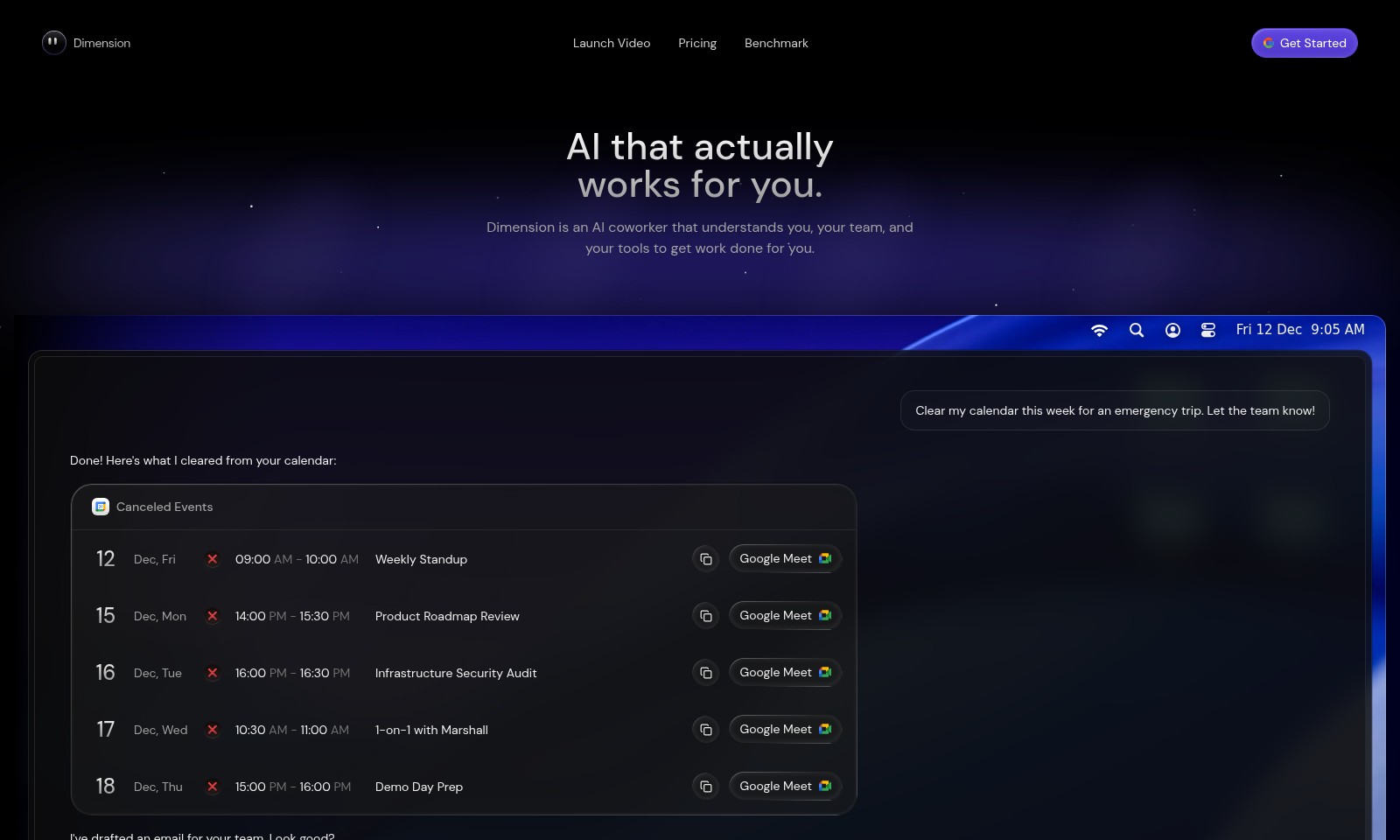
Dimension automatically clears your calendar for urgent tasks, ensuring you never miss an important meeting. With a streamlined integration with Google Meet, you can instantly manage your schedule with minimal input.
AI-Driven Email Drafting - Time Efficiency
Our intelligent email drafting feature allows you to generate context-aware messages in seconds. Dimension uses natural language processing to craft personalized emails to your team without requiring extensive edits from you.
Document and Media Handling - Centralized Workflow
Dimension provides seamless access to your documents, images, videos, and music within one platform. This integration minimizes time spent searching for files, allowing your team to focus on what truly matters: getting work done.
Comprehensive Project Benchmarking - Informed Decision-Making
Stay informed with Dimension's benchmarking tools that analyze project performance metrics against industry standards. This feature helps your team identify areas of improvement and strategize effectively.
Task Automation - Simplified Processes
Eliminate repetitive tasks with our advanced automation functionality. Dimension intelligently prioritizes and assigns tasks based on urgency and team availability, ensuring optimal allocation of resources.
Frequently Asked Questions About Dimension
Frequently Asked Questions
What is Dimension and how does it work?
Dimension is an AI coworker designed to seamlessly integrate with your existing workflow. It understands your team's needs and your tools to help automate tasks and enhance productivity.
How can Dimension help me manage my calendar?
Dimension can easily clear your calendar for emergencies or reschedule meetings on your behalf. By analyzing your schedule, it identifies and cancels conflicting events, ensuring your time is optimized.
What kind of documents can I manage with Dimension?
You can manage various types of documents, including papers, images, and videos. Dimension facilitates smooth management and organization of these files, making it easier to retrieve them when needed.
Is Dimension suitable for team collaboration?
Absolutely! Dimension is built for teams, enabling collaborative work environments by keeping everyone on track with their tasks and schedules. It integrates well with popular tools to foster effective teamwork.
What pricing plans are available for Dimension?
Dimension offers flexible pricing plans to cater to different business needs. Detailed information on pricing can be found on our website, allowing you to select the plan that best fits your requirements.
How do I get started with Dimension?
Getting started with Dimension is simple! Just visit our website, sign up for an account, and follow the onboarding prompts to set up your AI coworker to begin optimizing your workflow.
How to Use Dimension
Step 1: Register an Account
To start using Dimension, visit the website and click on the 'Get Started' button. Fill in your details in the registration form, including your name, email, and password, then hit 'Submit'. You'll receive a confirmation email to verify your account.
Step 2: Verify Your Email
Check your inbox for a verification email from Dimension. Click on the provided link to verify your email address. This step is crucial for securing your account and ensuring you can recover it if needed.
Step 3: Log In to Your Account
Once your email is verified, return to the Dimension website and log in using your registered email and password. This will take you to your dashboard, where you can start exploring the features.
Step 4: Set Up Your Profile
Navigate to the profile settings by clicking on your profile icon in the top right corner. Complete your profile by adding a profile picture, setting your availability, and linking your calendar. This personalization helps Dimension know your schedule and preferences.
Step 5: Integrate Your Tools
Dimension works best when connected with your existing tools. Go to the integrations section in settings and link your Google Calendar and any other productivity tools you use. This allows Dimension to access your schedule and assist you effectively.
Step 6: Explore Key Features
Start by checking out the 'Features' section. Dimension offers functionalities like calendar management, emailing, and task reminders. Take some time to understand each feature and how it can benefit your workflow.
Step 7: Use AI to Manage Your Calendar
With Dimension linked to your calendar, you can delegate tasks such as clearing events for emergencies. Simply type your request like you would to a colleague, and Dimension will adjust your schedule according to your instructions.
Step 8: Communicate with Your Team
Draft emails or messages to your team directly through Dimension. Use the built-in email draft feature to quickly communicate important updates. Ensure your messages are clear and concise for effective team collaboration.
Reviews
Pros
- Easy to use
- Fast processing
- Great results
- Affordable pricing
Cons
- Limited free version
- Requires internet connection
Comments
No comments yet. Be the first to share your thoughts!
Dimension - Alternative Platforms
For some alternatives to Dimension that you may need, we provide you with sites divided by features.

BlueMail offers a cross-platform email solution with advanced features like AI-powered email summarization, unified inboxes, and integrated calendar functionalities.
Missive is a collaboration tool designed for teams using email, offering features like shared inboxes, task management, and integrations for workflow optimization.
Discover how Read AI optimizes your meetings and communication through smart summarization and seamless tool integration.
Tidio Copilot is a free Chrome extension that automates responses for customer service teams, integrating with major platforms and enhancing productivity.