Okara
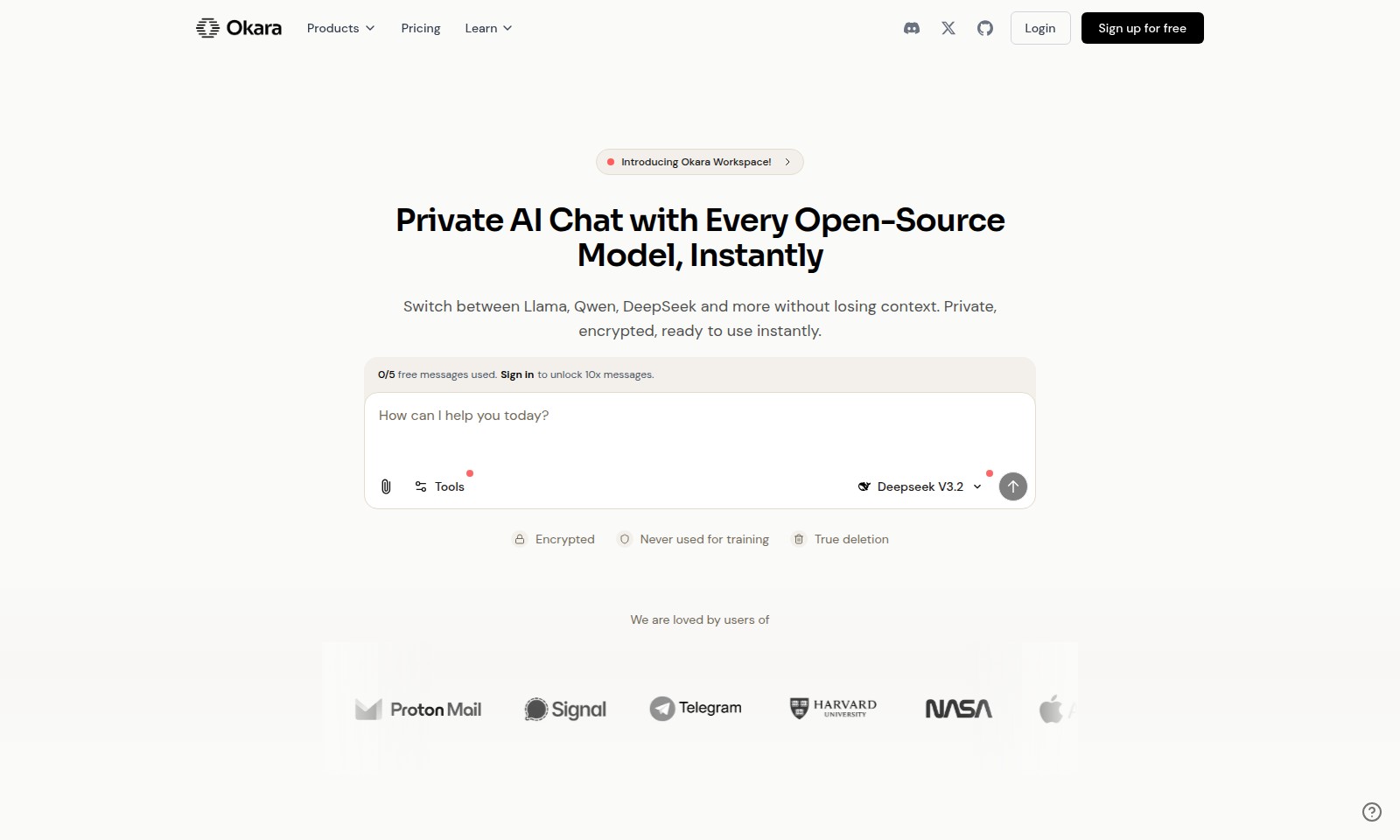
Okara Workspace offers private AI interaction using open-source models, prioritizing user privacy and enabling seamless workflows.
Okara Introduction
Welcome to Okara Workspace!
Okara Workspace is your go-to platform for leveraging the power of private AI chat with every open-source model at your fingertips. With cutting-edge technology, this workspace allows you to switch seamlessly between models like Llama, Qwen, and DeepSeek, enhancing your workflow while maintaining context. Experience the benefits of private, encrypted communications, providing a valuable resource for professionals who demand excellence in their AI interactions.
Okara Features
Okara Workspace - The Ultimate Private AI Chat Experience
Experience instant communication with every open-source AI model in a single workspace. Our solution enables seamless switching between models like Llama, Qwen, and DeepSeek without the hassle of losing context during your conversations.
Deepseek V3.2 - Advanced Data Insights
Unlock in-depth analytics with our latest Deepseek V3.2 feature. It provides powerful insights powered by encryption and ensures your data remains private and secure.
Multi-Model Integration - Streamlined Accessibility
Okara's multi-model integration allows you to access 20+ open-source AI models, including Qwen and Mistral, all in one place. No need for juggling multiple subscriptions, saving you both time and money.
Unified Memory - Enhanced Productivity
Utilize our unique unified memory system that keeps your chat history and context intact across different models. This feature boosts your productivity by minimizing interruptions and improving workflow efficiency.
File Uploading Capability - Versatile Data Handling
Easily upload various file formats, including images, documents, and spreadsheets, directly into your conversations. This feature supports enhanced communication by allowing you to share and discuss materials effectively without switching applications.
Frequently Asked Questions About Okara
What is Okara Workspace?
Okara Workspace is a fully private, multi-model AI platform that allows users to interact with various open-source AI models like Llama, Qwen, and DeepSeek. Users can switch between models without losing context, making it an ideal solution for professionals who require flexibility and privacy in their AI interactions.
How to Use Okara
Sign up for free
To start using Okara Workspace, visit the website and click on the 'Sign up for free' button. Fill out the registration form with your email and password to create your account.
Verify your email
Check your inbox for a verification email from Okara. Click on the verification link provided in the email to activate your account.
Log in to your account
After verifying your email, return to the Okara homepage and click on 'Login'. Enter your registered email and password to access your account.
Set up your profile
Once logged in, navigate to your profile settings. Fill in your personal details and preferences to customize your experience in Okara Workspace.
Explore the workspace
Familiarize yourself with the Okara Workspace interface. Check out the various sections like Tools, Products, and Learn to understand what features are available.
Choose an AI model
In the Tools section, select from a variety of open-source AI models available in Okara. You can choose between Llama, Qwen, DeepSeek, and more based on your specific needs.
Start a new project
Click on the 'New Project' button to initiate a task. You can drag and drop files or paste images directly into the workspace to begin your work.
Utilize integrated search tools
Make use of the integrated search tools in Okara to find relevant resources and information quickly. This will help streamline your workflow.
Monitor your usage
Keep track of your usage by checking the message count on your dashboard. Remember, you start with 0/5 free messages and can unlock additional functionality by signing in.
Experiment with features
Try out different features available in the workspace such as file uploads for various formats including JPEG, PNG, PDF, and DOC. Experiment with image generation tools to enhance your projects.
Ensure privacy and security
Okara Workspace guarantees that your data is encrypted and not used for training. Review the privacy policy to understand how your information is protected.
Reviews
Pros
- Easy to use
- Fast processing
- Great results
- Affordable pricing
Cons
- Limited free version
- Requires internet connection
Comments
No comments yet. Be the first to share your thoughts!
Okara - Alternative Platforms
For some alternatives to Okara that you may need, we provide you with sites divided by features.

ThetaWave AI simplifies note-taking by turning lectures, files, and videos into structured notes, quizzes, and flashcards for effective studying.
Impel offers a powerful AI platform that streamlines dealership processes, improves customer interactions, and boosts performance across the automotive industry.
MYND offers an AI-driven app designed for personal mental wellness, featuring custom meditations and supportive conversations for users.
Alya is an AI-powered app that supports mental health and personal growth, providing tools for organization, goal setting, and emotional tracking.