Free Paraphrasing Tool
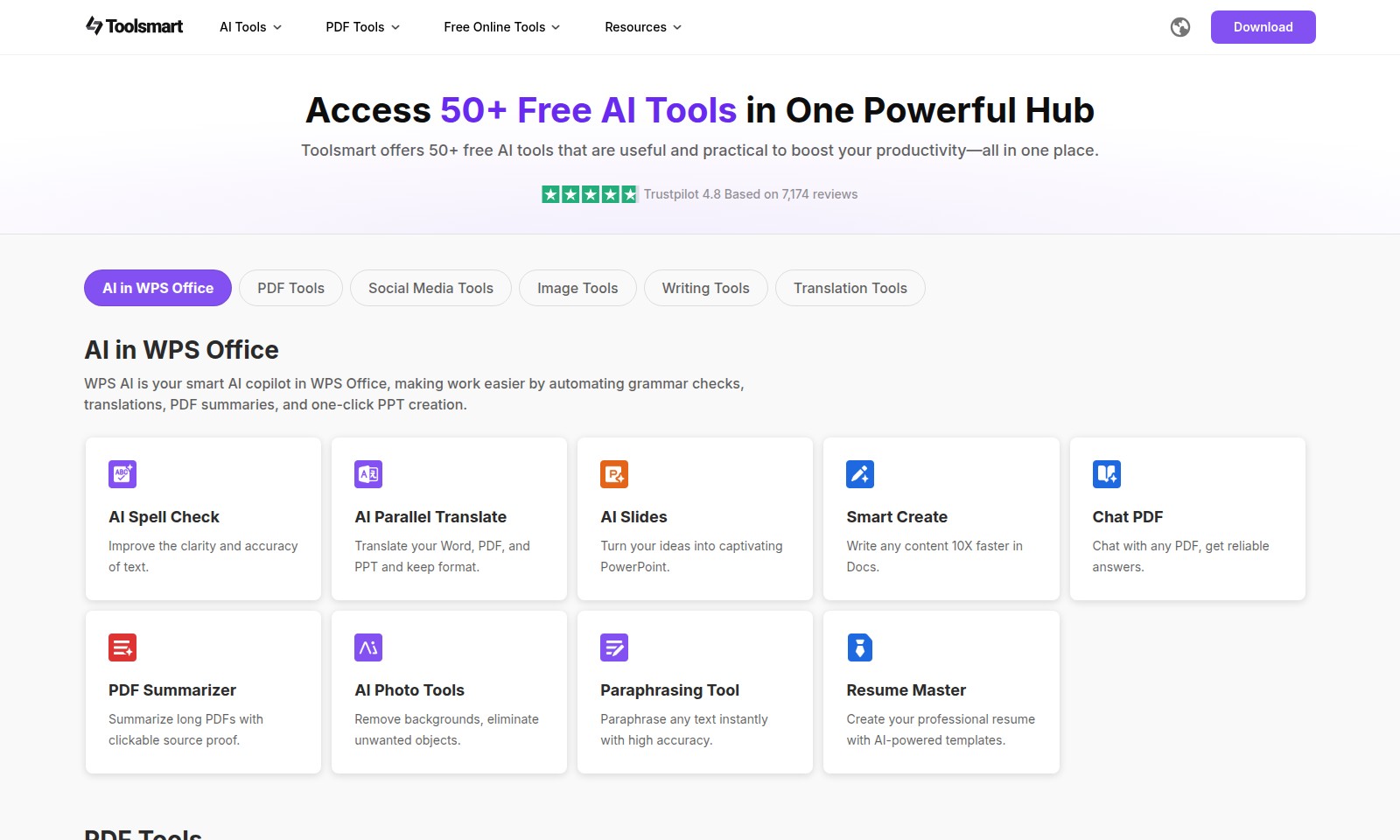
Toolsmart offers a comprehensive hub for over 50 free AI tools, from PDF management to social media content downloading, boosting productivity like never before.
Free Paraphrasing Tool Introduction
Explore the Power of AI Tools
Discover the future of productivity with Toolsmart, your one-stop hub for over 50 free AI tools designed to enhance your efficiency and streamline your workflow. Our platform equips you with innovative solutions for various tasks ranging from writing and translation to image editing and PDF management, enabling you to work smarter, not harder.
Free Paraphrasing Tool Features
AI Spell Check - Improve the clarity and accuracy of text.
WPS AI’s spell check feature is able to automatically detect and suggest corrections for grammatical errors, enhancing the overall quality of written content. It allows users to produce error-free documents efficiently, making it an essential tool for anyone aiming to maintain professionalism in their writing.
AI Parallel Translate - Translate your Word, PDF, and PPT and keep format.
This feature excels in preserving the original document's formatting while translating text. Users can seamlessly convert text in various file formats without worrying about layout issues, significantly reducing time wasted on manual adjustments during the translation process.
AI Slides - Turn your ideas into captivating PowerPoint.
The AI Slides feature transforms concepts into visually appealing presentations by automatically generating slide layouts and content suggestions based on user input, thus saving valuable time while ensuring impactful delivery of ideas.
Smart Create - Write any content 10X faster in Docs.
With the Smart Create feature, users can leverage AI to brainstorm and generate content rapidly. This tool not only reduces the time spent on writing but also enhances productivity, enabling professionals to focus on more strategic tasks while ensuring high-quality output.
Chat PDF - Chat with any PDF, get reliable answers.
This innovative feature allows users to engage in interactive conversations with their PDF documents, enabling them to extract needed information quickly. It redefines how content is accessed and understood, paving the way for more efficient workflow processes.
PDF Summarizer - Summarize long PDFs with clickable source proof.
The PDF Summarizer distills lengthy documents into concise summaries while providing clickable references for verification. This function is particularly beneficial for professionals who need to quickly grasp essential content without reading entire texts, significantly enhancing information consumption efficiency.
AI Photo Tools - Remove backgrounds, eliminate unwanted objects.
The AI Photo Tools offer capabilities for advanced image editing, such as background removal and object elimination. These features help users create visually cleaner images, beneficial for presentations and marketing materials, while saving time on graphic design tasks.
Frequently Asked Questions About Free Paraphrasing Tool
FAQs about AI Tools on Toolsmart
What kind of AI tools does Toolsmart offer?
Toolsmart provides access to over 50 free AI tools that boost productivity in various domains such as document preparation, image editing, translations, and social media management. These tools are designed to simplify tasks and improve efficiency in your workflow.
How does the WPS AI feature enhance productivity?
The WPS AI feature acts as a smart copilot in WPS Office, offering functionalities like grammar checks, translation services, and PDF summarization. With AI Slides, you can also create stunning presentations from your ideas in just a few clicks.
Is there a cost associated with using these AI tools?
No, all the tools available on Toolsmart are free to use. You can access and utilize them without any hidden fees, making them perfect for students, professionals, and anyone looking to improve their productivity.
Can I translate documents using Toolsmart’s AI tools?
Yes, you can utilize the AI Parallel Translate tool to translate Word, PDF, and PPT documents while maintaining their original formatting. This feature ensures accuracy and ease of use, helping you save time on translations.
How does the PDF Summarizer work?
The PDF Summarizer tool allows you to condense lengthy PDF documents into concise summaries. It provides clickable source proof to easily refer back to the original content, ensuring you grasp the essential points quickly and effectively.
What can I do with the AI Photo Tools?
The AI Photo Tools include features for background removal, eliminating unwanted objects, and enhancing image quality. These tools are perfect for social media managers and marketers looking to create visually appealing content quickly.
How to Use Free Paraphrasing Tool
Step 1: Register for an Account
Visit the Toolsmart website and click on the 'Sign Up' button. Fill in your personal details, including your email and a secure password.
Step 2: Verify Your Email
Check your email inbox for a verification link from Toolsmart. Click on the link to verify your account and unlock the full features of the platform.
Step 3: Set up Your Profile
After verifying your email, log in to your account and complete your profile. Add your name and any relevant information that will enhance your experience.
Step 4: Explore Available AI Tools
Navigate to the main dashboard where you can view over 50 free AI tools. Browse through categories like Writing Tools, PDF Tools, and Image Tools for effective productivity enhancements.
Step 5: Utilize the WPS AI Tool
Access the WPS Office tools designed to make your work easier. Use the AI Spell Check to improve text clarity or try the Smart Create feature to write content faster.
Step 6: Work with PDF Tools
Make use of the PDF Tools. You can chat with PDFs using the Chat PDF feature to get accurate answers or summarize lengthy documents with PDF Summarizer.
Step 7: Engage with Social Media Tools
Check out the Social Media Tools available. These can help you create engaging content or manage your social media presence.
Step 8: Download Your Work
After completing your projects, download your work directly from the platform. Ensure your files are saved in the format you need for future use.
Reviews
Pros
- Easy to use
- Fast processing
- Great results
- Affordable pricing
Cons
- Limited free version
- Requires internet connection
Comments
No comments yet. Be the first to share your thoughts!
Free Paraphrasing Tool - Alternative Platforms
For some alternatives to Free Paraphrasing Tool that you may need, we provide you with sites divided by features.

Cudekai offers AI writing and detection tools to enhance your content, featuring a humanizer, plagiarism checker, and more—trusted by thousands.
Aithor is a platform offering AI tools for writing, sourcing, and structuring academic content, making research and writing easier.
Descubre cómo Parafrasear Textos puede transformar tu escritura académica y profesional con herramientas avanzadas de parafraseo y corrección.
BypassGPT offers an advanced AI humanizing tool to turn AI text into undetectable content, ensuring originality and high engagement.