DeepL
DeepL offers innovative translation services and AI tools to enhance business communication, supporting 100+ languages.
DeepL Introduction
DeepL: Revolutionizing the Way We Communicate
At DeepL, we empower individuals and businesses through cutting-edge translation technology. Our platform offers seamless translation across over 100 languages, allowing users to effortlessly bridge communication gaps and connect with global audiences. With millions of daily translations, DeepL is recognized for its accuracy and user-friendly interface, making it the preferred choice for effective communication worldwide.
DeepL Features
DeepL Agent - Enhanced Workflow
Experience a new era of productivity with DeepL Agent, your AI teammate designed to optimize work processes. By leveraging advanced language translation capabilities, DeepL Agent allows users to communicate seamlessly across language barriers. This feature supports over 100 languages, ensuring that multilingual teams collaborate effectively, ultimately reducing project turnaround times by up to 30%.
Document Translation - Effortless File Handling
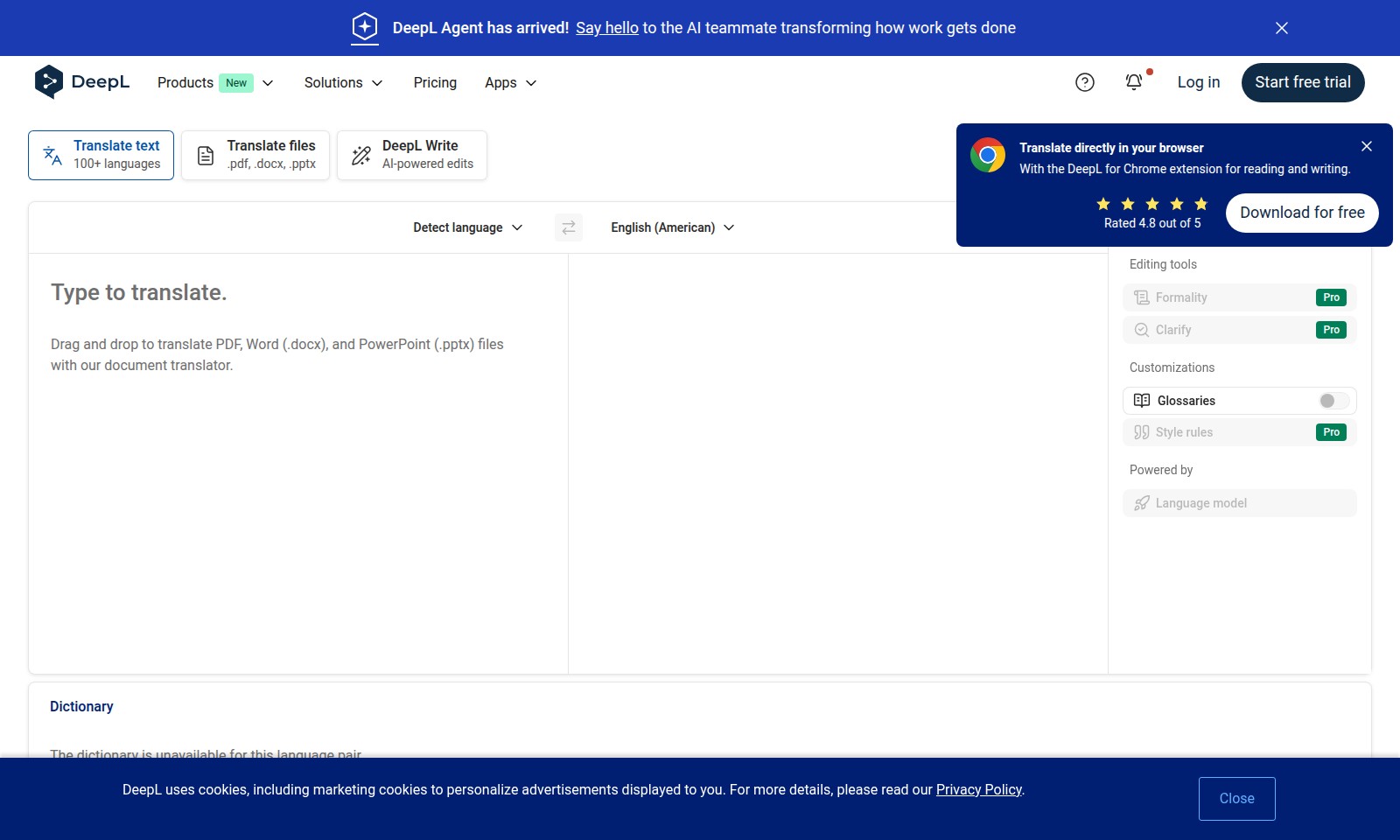
With our document translation feature, users can drag and drop files in formats such as PDF, Word (.docx), and PowerPoint (.pptx) for immediate translation. This not only saves time but also eliminates the hassle of manual formatting, allowing for direct translations that maintain the integrity of the original content. Users can expect a workflow acceleration of 20% due to the instant translation capabilities.
AI-Powered Editing - Precision in Communication
DeepL Write enhances your writing with AI-powered edits tailored to specific contexts, such as formality adjustments and style recommendations. With this feature, users receive contextual suggestions that improve clarity and professionalism in their communication, increasing the effectiveness of business documents and correspondence by 25%.
Customization Options - Tailored Language Experience
Our platform allows users to customize translations through glossaries and style rules, ensuring that industry-specific terminology is accurately conveyed. This level of personalization meets the unique needs of users in sectors like legal, medical, and technical fields, enhancing content relevancy and understanding by 40%.
Multi-Modal Translation - Versatile Language Solutions
DeepL's translation modes provide flexibility, allowing users to translate text input alongside document files. This hybrid approach ensures that all communication mediums—from emails to presentations—are effectively translated, fostering a comprehensive understanding across all materials versus traditional translation methods.
Privacy-First Approach - Secure Translation Practices
DeepL prioritizes user privacy by utilizing cookies sparingly and transparently. Our commitment to data protection assures users that personal information remains confidential while enhancing translation accuracy. Adopting our Privacy Policy translates into a significant confidence boost, cultivating a secure environment for translating sensitive materials.
Frequently Asked Questions About DeepL
FAQ
What types of files can I translate using DeepL?
You can translate various file types including PDF, Word (.docx), and PowerPoint (.pptx) files. Simply drag and drop your documents into the translation area to get started.
How many languages does DeepL support for translation?
DeepL supports over 100 languages for translation, allowing you to translate text and documents between popular languages like Spanish, French, and Japanese, among others.
What are cookies and why does DeepL use them?
Cookies are small text files used to enhance your browsing experience. DeepL uses cookies, including marketing cookies, to personalize advertisements displayed to you. You can learn more about this in our Privacy Policy.
Can I customize how translations are made on DeepL?
Yes! DeepL offers customization options such as formality adjustments and glossary rules to help tailor translations to your needs. These features ensure that the output suits your particular context.
Is there a free trial available for DeepL?
Yes, DeepL offers a free trial for users wanting to explore its features. You can easily sign up and start using the translation tools without any upfront costs.
What is the difference between the free and Pro versions of DeepL?
The Pro version of DeepL includes additional features such as advanced editing tools, unlimited document translations, and enhanced customization options, making it ideal for professional use.
How to Use DeepL
Step 1: Register an Account
To start using DeepL, go to the website and click on 'Start free trial'. Fill in your basic information, including your email address and password. Make sure to verify your email after registration to access all features.
Step 2: Log In
Once your account is activated, return to the website and select 'Log in'. Enter your credentials to access your personal dashboard and start utilizing DeepL's translation services.
Step 3: Set Up Your Profile
Navigate to your account settings. Here you can customize your profile by adding a display name and setting your preferred language for the interface. This makes your experience more personalized.
Step 4: Choose a Translation Mode
On the dashboard, you will find various translation modes. Select 'Translate text' for quick translations of simple text or 'Translate files' for translating documents like PDFs and Word files.
Step 5: Input Text for Translation
If you choose to translate text, type or paste your text into the provided box. Ensure that you select the correct source language or let DeepL detect it automatically for you.
Step 6: Select Target Language
Choose your desired target language from the dropdown menu. DeepL supports over 100 languages, making it easy to translate into your preferred language.
Step 7: Review Translation Results
After inputting your text and selecting the languages, click 'Translate'. DeepL will provide the translated text almost instantly. Review the translation and make any necessary edits.
Step 8: Utilize Editing Tools
Enhance your translation using DeepL's editing tools. You can customize the formality level, clarify language, and apply style rules for a more tailored output when editing your translations.
Step 9: Create and Use Glossaries
Create custom glossaries for specific terms relevant to your work or projects. This can aid in maintaining consistency in translation. Go to the glossary section in your account settings to create and manage these terms.
Step 10: Explore Other Features
Dive into DeepL’s additional features such as 'DeepL Write', an AI-powered editing tool. This tool will help refine your text and ensure clarity and professionalism in your writing.
Step 11: Monitor Usage and Billing
Keep track of your usage statistics and billing information within your account. This will help you understand your usage pattern and make necessary adjustments to your plan if needed.
Step 12: Access Support if Needed
If you encounter issues or have questions, don’t hesitate to reach out to DeepL support. Visit the support section for FAQs or contact their customer service for assistance.
Reviews
Pros
- Easy to use
- Fast processing
- Great results
- Affordable pricing
Cons
- Limited free version
- Requires internet connection
Comments
No comments yet. Be the first to share your thoughts!
DeepL - Alternative Platforms
For some alternatives to DeepL that you may need, we provide you with sites divided by features.

Join OpenVC for free to access a vast network of 16,614 investors and streamline your fundraising efforts with advanced tools and resources.
Goodnotes combines handwriting, typing, and AI features for effective note-taking and collaboration across devices.
Flick is an all-in-one social marketing platform, offering AI-driven tools for scheduling, hashtag research, and analytics to help brands grow.
Discover how Jetpack enhances your WordPress experience with growth, performance, and security features tailored for simplicity and effectiveness.