Image to Image AI
Image to Image AI allows users to creatively modify images by maintaining core composition while applying desired changes, enhancing design workflow and efficiency.
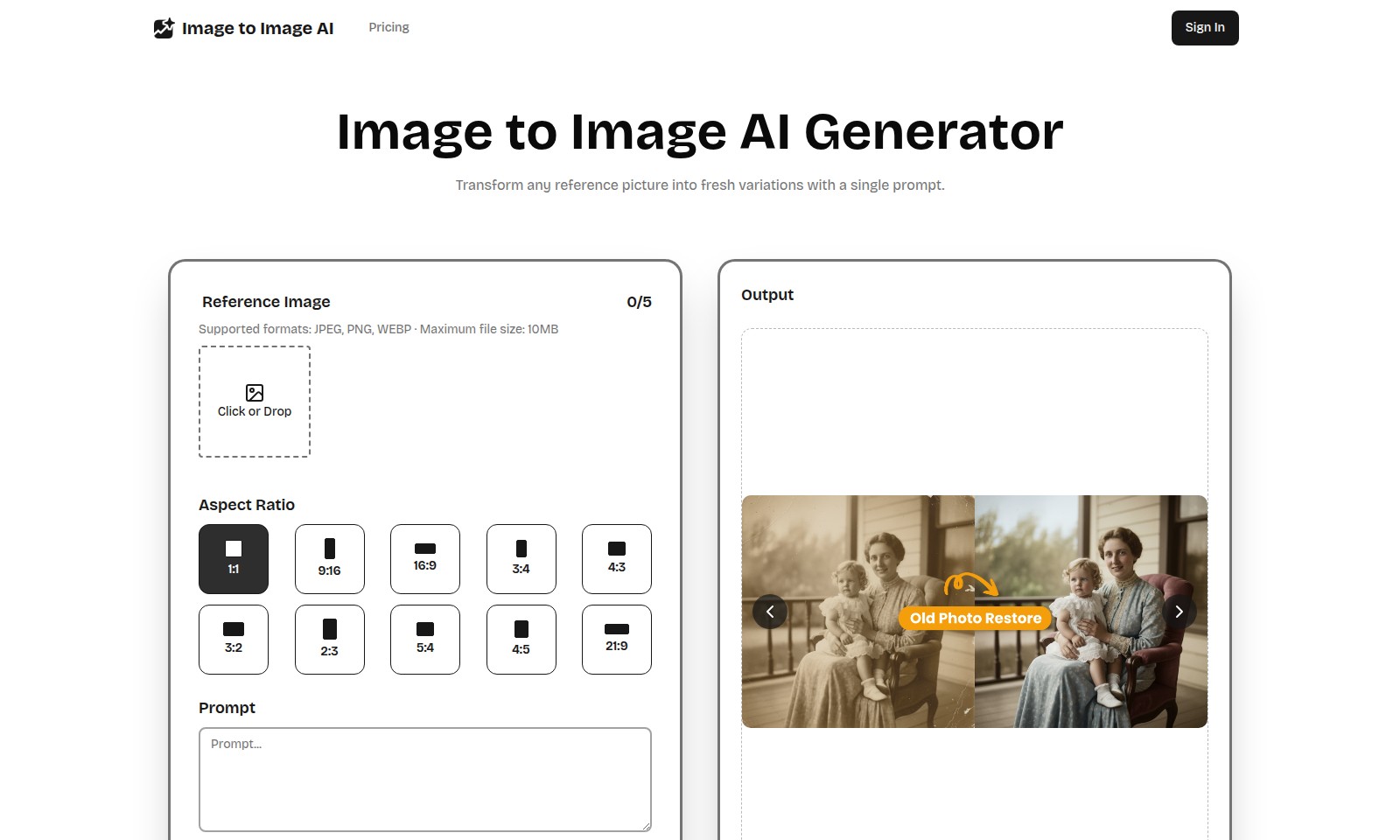
Image to Image AI Introduction
Image to Image AI: Revolutionizing Your Visual Creations
The Image to Image AI Generator empowers creators by transforming reference pictures into fresh variations with a single prompt. With the ability to handle various formats including JPEG, PNG, and WEBP, this tool supports images up to 10MB, allowing you to explore your creativity without limits.
Image to Image AI Features
Transformative Image Enhancements - Elevate your creative vision with minimal effort.
Our Image to Image AI Generator allows creators to seamlessly transform reference images into innovative variations with just a single prompt, ensuring a user-friendly experience that enhances productivity for artists and designers alike.
Core Composition Preservation - Maintain artistic integrity while innovating.
Unlike traditional text-to-image generators, our tool retains key subjects and structures of your original image, giving you the freedom to innovate around the essence of your artwork.
Rapid Style Iteration - Achieve your desired aesthetic swiftly.
With the ability to swap styles and moods instantly, our AI supports rapid prototyping, making it an invaluable resource for graphic designers and content creators needing quick visual iterations.
Fine-Tuned Control - Customization at your fingertips.
Adjusting parameters like strength, aspect ratio, and output count allows users to tailor the generated images precisely to their specifications, ensuring that the final output meets their creative goals.
Versatile Format Support - Flexibility for every project.
Our platform supports multiple formats including JPEG, PNG, and WEBP, accommodating diverse project requirements while ensuring up to a maximum file size of 10MB per image.
User-Centric Credits System - Affordable access to advanced features.
The credit-based system allows users to generate images efficiently while managing their resources, catering to both amateur and professional creators who seek cost-effective solutions for their projects.
Comprehensive Output Management - Streamline your workflow.
Our "My Images" section helps users keep track of their generated content, ensuring easy access and management of images, which is crucial for professionals handling multiple projects.
Frequently Asked Questions About Image to Image AI
What is Image to Image AI?
Image to Image AI is a powerful tool that allows you to transform any reference picture into fresh variations using a simple prompt. Unlike traditional text-to-image tools, this AI retains the core composition of your original image while applying the style or changes you describe, giving you total creative control.
How do I use the Image to Image AI Generator?
To get started, simply upload your reference image in a supported format (JPEG, PNG, WEBP) with a maximum file size of 10MB. Then, choose your desired aspect ratio and input your prompt describing the changes you'd like to see. Finally, click 'Generate' to create your new image variations.
What are the supported file formats for my reference image?
Our Image to Image AI supports JPEG, PNG, and WEBP formats. You can upload images up to 10MB in size, ensuring that you can work with high-quality visuals for the best results.
Can I adjust the output of my generated images?
Yes! Our tool allows you to fine-tune the strength of the transformation, aspect ratio, and output count. This means you can customize your generated images to better match your vision and requirements.
How does the AI ensure the core composition is preserved?
The AI is designed to keep key subjects and structures intact while applying the desired changes. This means you can focus on altering styles or moods without losing the essence of your original image.
What are the credits system used in Image to Image AI?
To use the image generation feature, each operation requires a certain number of credits. For example, generating a new image may cost you 5 credits. Be sure to keep track of your credits to continue using the tool effectively.
How to Use Image to Image AI
Register an Account
To start using the Image to Image AI, you first need to register an account. Click on the 'Sign In' button and select the 'Register' option to create a new account. Fill out the necessary information like your email and password.
Verify Your Email
Check your email for a verification link. Click the link to verify your account, ensuring you can access all features of the platform.
Log In to Your Account
Once verified, return to the site and log in using your registered email and password. This will take you to your personal dashboard.
Set Up Your Profile
After logging in, navigate to your profile settings. Here, you can adjust your personal information and upload a profile picture to personalize your experience.
Upload Your Reference Image
On the dashboard, find the 'Upload' section. Click or drag your desired reference image into the designated area. Remember, supported formats include JPEG, PNG, and WEBP, with a maximum file size of 10MB.
Choose Aspect Ratio
Select an aspect ratio for your image from the available options. The choices include 1:1, 16:9, 3:4, and more, depending on how you want the final output to be displayed.
Enter Your Prompt
In the prompt box, describe the changes or style variations you want to apply to your reference image. Be as detailed as possible to guide the AI in understanding your vision.
Generate Your Images
Click the 'Generate' button to create variations of your image based on your prompt. The AI will process your request and provide several outputs you can choose from.
Review Your Images
Once the images are generated, you'll find them in the 'My Images' section. Review each generated image and select the ones that meet your expectations.
Download Your Images
Select the images you want to download and click on the download button. Ensure you save them to a secure location on your device for future use.
Explore Additional Features
Now that you've created your images, explore other features of the platform, such as fine-tuning controls, style swapping, and other enhancements to further develop your creative projects.
Reviews
Pros
- Easy to use
- Fast processing
- Great results
- Affordable pricing
Cons
- Limited free version
- Requires internet connection
Comments
No comments yet. Be the first to share your thoughts!
Image to Image AI - Alternative Platforms
For some alternatives to Image to Image AI that you may need, we provide you with sites divided by features.

Discover a powerful online AI tool that allows you to transform images by providing descriptions and manipulating settings for personalized results.
SynthID Remover detects and removes invisible watermarks from AI-generated images without affecting quality, ideal for designers and creators.
Experience professional-quality picture to drawing transformations with privacy assured. Create unique artworks from your images effortlessly.
Discover Face Swap AI, the user-friendly tool that enables effortless face swapping in photos and videos, bringing creativity to your edits.