Mureka
Mureka offers tools for music creation, audio editing, and lyric generation, catering to various styles and themes.
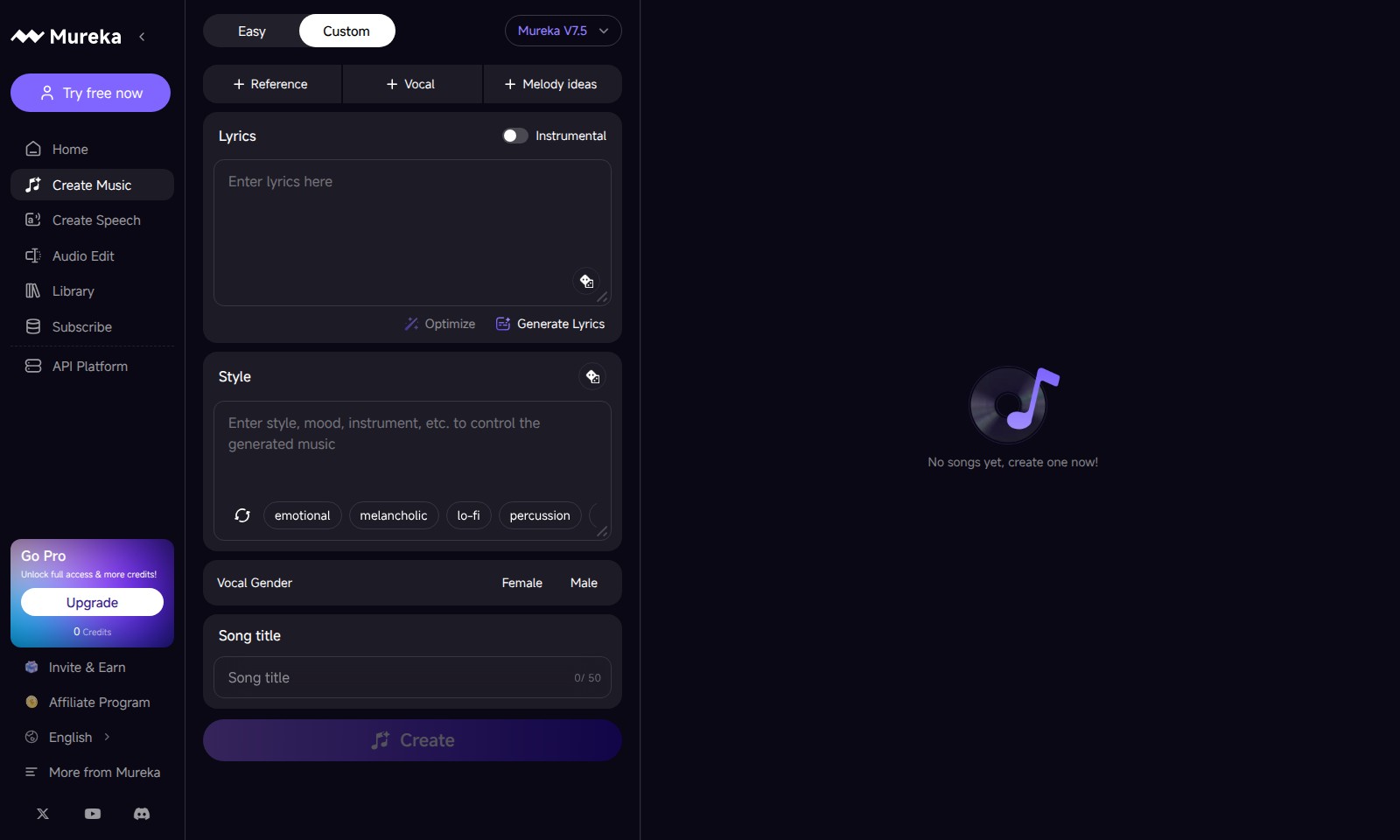
Mureka Introduction
MUREKA: Elevate Your Audio Creation Experience
MUREKA is an innovative platform designed for creators, musicians, and content developers seeking to produce high-quality audio effortlessly. With features that cater to both beginners and professional users, MUREKA empowers you to create music, craft speech, and edit audio with unparalleled ease and precision.
Whether you want to generate lyrics that resonate emotionally or experiment with various musical styles—from lo-fi and orchestral to upbeat and melancholic—MUREKA offers powerful tools to inspire your creativity. Sign up now to explore the unlimited potential of audio creation at your fingertips.
Mureka Features
Creative Music Creation - Tailored for Every Artist
MUREKA empowers users to craft music effortlessly with its intuitive interface. Unlike traditional platforms, our real-time generation allows for immediate feedback and adjustment of musical elements.
Advanced Speech Generation - Enhance Communication
MUREKA transforms text into natural-sounding speech with a wide array of voice styles. Our cutting-edge AI ensures clarity and emotion, catering specifically to educators and content creators seeking to engage their audiences.
Seamless Audio Editing - Precision at Your Fingertips
Our audio editing tool offers unmatched precision and control over sound elements. Integrated plugins and effects libraries provide advanced customization, perfect for audio professionals needing to perfect their tracks.
Extensive Library - A Resource of Infinite Possibilities
With MUREKA's extensive library, users gain instant access to a diverse range of instrumental tracks and vocal styles. Moreover, our curated selections are updated regularly to reflect current trends, ensuring relevance for modern creators.
Subscription Benefits - Empower Your Creative Journey
Unlock full access to MUREKA features with a professional subscription. Not only do you enjoy more credits, but also priority support and exclusive access to upcoming tools, tailored for serious artists looking to elevate their craft.
Frequently Asked Questions About Mureka
FAQ Section
1. How can I create music using MUREKA?
To create music with MUREKA, simply sign up and navigate to the 'Create Music' section. You can choose various styles such as emotional, upbeat, or orchestral, and customize elements like instrumental types and vocal gender.
2. What features are included in the free trial?
The free trial allows you to explore essential features of MUREKA, including music creation and basic audio editing tools. You will have limited credits to generate content but can experience the core functionalities before subscribing.
3. How does the API platform work?
MUREKA's API platform enables developers to integrate music generation capabilities into their applications. You can access various features such as generating lyrics, melody ideas, and more through the API, facilitating seamless integration into your project.
4. What should I do if I run out of credits?
If you run out of credits, you can choose to subscribe to one of our plans for full access to all features, or invite friends to earn additional credits. Regularly monitoring your usage can help you manage your credits effectively.
5. Can I customize the music style and vocals?
Yes, MUREKA allows extensive customization of both music style and vocal elements. You can select from a variety of emotional themes and vocal genders, ensuring your creation aligns with your vision.
6. What happens if I want to upgrade to the Pro version?
Upgrading to the Pro version unlocks full access to all features, more credits, and advanced tools for professional music creation. It's an excellent option for users looking to explore MUREKA's capabilities more deeply.
How to Use Mureka
Step 1: Register an Account
To start your journey with MUREKA, visit the homepage and click on 'Try free now'. Fill in the registration form with your email and create a secure password. Hit 'Sign Up' to create your account.
Step 2: Set up your Profile
Once registered, you will be prompted to set up your profile. Upload a profile picture and fill out your personal details to personalize your experience on MUREKA.
Step 3: Explore Key Features
Familiarize yourself with the main features by navigating through the site. Check out options like 'Create Music', 'Create Speech', and 'Audio Edit' to understand the tools available for your creative process.
Step 4: Create Your First Project
Start your first project by selecting 'Create Music'. Choose between vocal, instrumental, or a combination, and click on 'Create'. You’ll then be taken to the creation interface.
Step 5: Generate Lyrics
If you need lyrics for your song, select the 'Generate Lyrics' option. Input your desired style, such as emotional or upbeat, and let MUREKA help you compose the perfect lyrics.
Step 6: Edit Your Music
Use the 'Audio Edit' feature to refine your sound. You can adjust volumes, add effects, or cut segments to enhance the overall quality of your music.
Step 7: Save and Share Your Work
Once satisfied with your creation, save your project. You can share your music with others or invite friends to collaborate by using the 'Invite & Earn' feature.
Step 8: Upgrade Your Experience
Consider upgrading to the 'Go Pro' option for full access and more credits. This will unlock additional features and resources to elevate your music creation process.
Reviews
Pros
- Easy to use
- Fast processing
- Great results
- Affordable pricing
Cons
- Limited free version
- Requires internet connection
Comments
No comments yet. Be the first to share your thoughts!
Mureka - Alternative Platforms
For some alternatives to Mureka that you may need, we provide you with sites divided by features.

Make Song AI provides an intuitive platform for generating complete songs effortlessly, catering to all musical tastes and levels of experience.
Lyrics to Song AI converts written lyrics into complete, professional songs using advanced AI technology. Create music in various genres with realistic vocals and commercial licensing.
AutoMusic is an AI tool that allows users to create custom songs quickly, providing an intuitive platform for music generation.
HiMusic allows users to generate and customize AI-powered music quickly and easily, suitable for both novices and professionals.