Minecraft Circle Generator
Generate and customize circles for Minecraft using the Bresenham midpoint algorithm, allowing for precise building in the game.
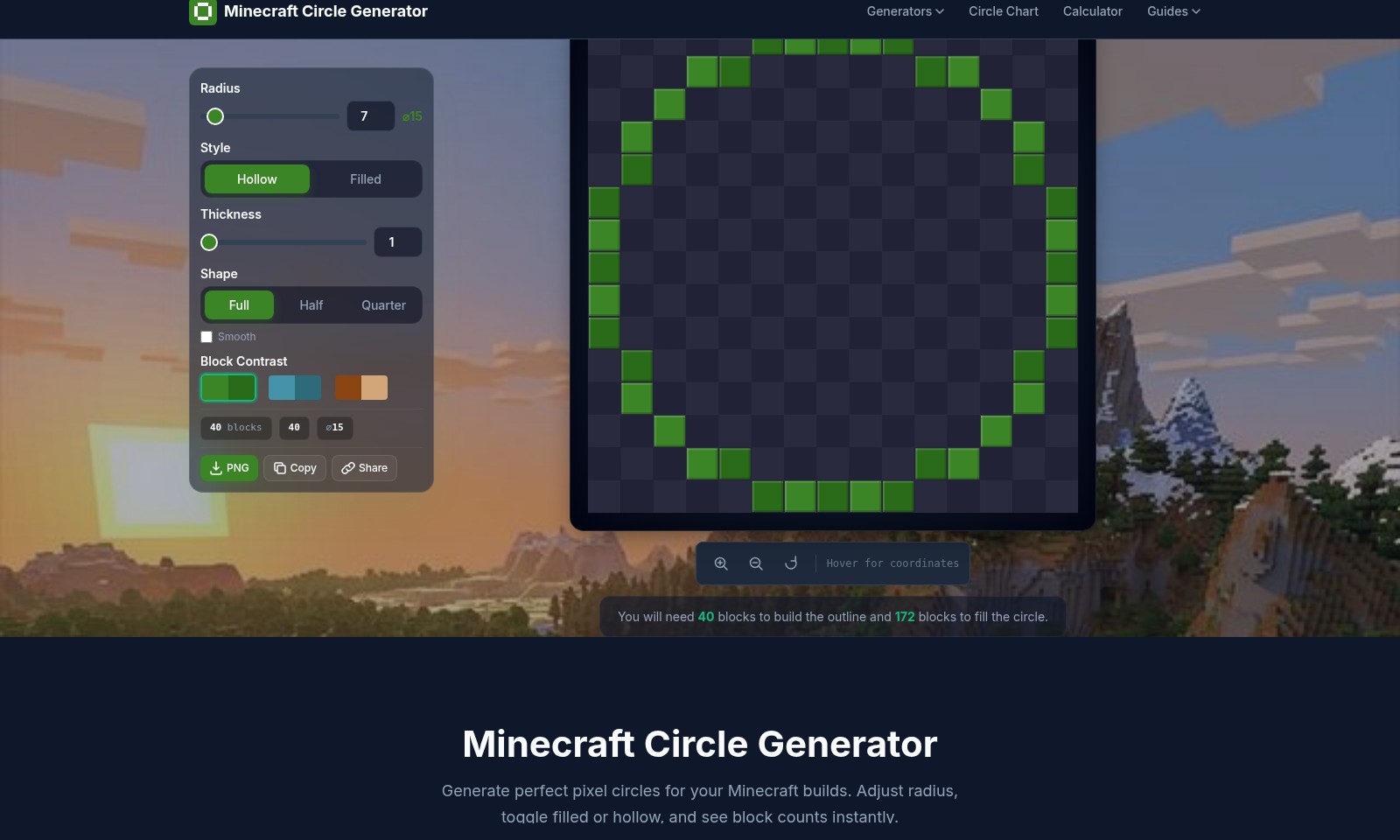
Minecraft Circle Generator Introduction
Minecraft Circle Generator
Generate perfect pixel circles for your Minecraft builds. With our intuitive tool, you can easily adjust the radius, toggle between filled or hollow styles, and instantly see the block counts required for your project. This efficient resource simplifies the process of creating intricate round designs in a square block world, making it an essential addition to any Minecraft builder's toolkit.
Minecraft Circle Generator Features
Minecraft Circle Generator - Precision in Design
Generate perfect pixel circles for your Minecraft builds. The Minecraft Circle Generator allows you to adjust the radius and choose between filled or hollow styles instantly, ensuring accuracy in your designs. With just a few clicks, you can visualize your project before you start building, saving time and effort and elevating your construction projects to the next level.
Dynamic Radius and Style Adjustment - Flexible Options
You have the freedom to set the radius anywhere from 1 to 128 blocks and toggle between hollow and filled styles. This flexibility accommodates a range of design needs, from basic structures to intricate designs, making it suitable for casual builders and advanced architect-level creators alike. By streamlining the design process, users can focus more on creativity rather than calculations.
Block Count Calculation - Preparation Made Easy
The generator provides instant block counts, letting you know exactly how many blocks are required for both outline and fill types. For example, a circle with a radius of 15 requires 40 blocks for construction and 172 blocks to fill completely. This feature prevents material waste and encourages efficient resource management, ensuring that users are well-prepared for their building sessions.
User-Centric Interface - Intuitive Design
The user interface is designed to be straightforward, allowing for quick inputs and immediate visual feedback. When toggling between settings, users can see modifications in real-time, enabling instant adjustments to their designs. This practical approach caters to all players, whether you’re a novice just starting out or a seasoned builder looking to refine your craft.
Compatible with Various Use Cases - Versatile Utility
Whether you're crafting a small well, a grand arena, or a complex garden, the Minecraft Circle Generator is a versatile tool suited for various design scenarios. The precision it offers is particularly beneficial for creating visually appealing structures that enhance gameplay experiences. Moreover, it aids players in realizing their architectural visions without the frustration of manual measurements and adjustments.
Advanced Algorithm Utilization - Enhanced Accuracy
This generator employs the Bresenham midpoint algorithm, a method that eliminates inaccuracies in traditional circle-drawing techniques within the blocky confines of Minecraft. With this advanced computational foundation, users can achieve pixel-perfect patterns that align perfectly with Minecraft's grid system. This precision is crucial for builders who value detail and accuracy in their architectural projects.
Easy Sharing and Collaboration - Community Engagement
After generating a circle, you can effortlessly copy and share your designs with other players. This fosters community engagement and allows for collaborative projects within Minecraft, enriching the overall gameplay experience. Sharing your circle designs opens avenues for feedback and improves community creativity, pushing the limits of what can be achieved within the game.
Frequently Asked Questions About Minecraft Circle Generator
What is the Minecraft Circle Generator?
The Minecraft Circle Generator is a tool designed to help players create perfect pixel circles for their Minecraft builds. Whether you want to construct a small decorative well or a large arena, this generator simplifies the process by providing clear guidelines on how many blocks are needed based on your specified radius and style.
How do I use the Circle Generator?
Using the Minecraft Circle Generator is straightforward. Simply input your desired radius, select whether you want a hollow or filled style, and the tool will automatically calculate the number of blocks required. Additionally, it offers instant block count updates as you make adjustments.
What are the styles available?
In the Circle Generator, you can choose between 'Hollow' and 'Filled' styles. The Hollow style is perfect for outlines like walls and towers, while the Filled style is great for solid platforms. You can also select different shapes such as Full, Half, or Quarter circles, depending on your design needs.
How many blocks do I need for a specific circle?
For a circle with a radius of 15 blocks, you will need 40 blocks to build the outline (hollow) and a total of 172 blocks if you choose to fill the circle. This information helps you prepare the necessary resources before starting your build.
Can I share my designs generated from this tool?
Yes! The Minecraft Circle Generator allows you to copy the generated designs easily. You can share your designs with friends or save them for later use in your Minecraft projects. This feature enhances collaborative building experiences within the Minecraft community.
How to Use Minecraft Circle Generator
Step 1: Register an Account
Go to the Minecraft Circle Generator website and click on the 'Register' button. Fill in the required information including your username, email, and password to create a new account.
Step 2: Verify Your Email
Check your email for a verification link sent by the Minecraft Circle Generator. Click the link to confirm your account and gain full access to the site's features.
Step 3: Log In
Return to the website and click on the 'Log In' button. Enter your registered email and password to access your account.
Step 4: Set Up Your Profile
Once logged in, navigate to your profile settings. Update your profile picture and personal information to make it uniquely yours.
Step 5: Explore the Circle Generator
On the homepage, find the Minecraft Circle Generator tool. This is where you will create perfect pixel circles for your builds.
Step 6: Set the Radius & Style
Use the provided fields to enter a radius between 1 and 128 blocks. Select either 'Hollow' for outlines or 'Filled' for solid circles to suit your project needs.
Step 7: Generate Your Circle
Click the 'Generate' button to produce the circle based on the radius and style you selected. The tool uses the Bresenham midpoint algorithm for accurate results.
Step 8: View Calculations
Immediately, you'll see visual block representations along with the total block counts. For example, a radius of 15 requires 40 blocks for the outline and 172 blocks to fill the circle.
Step 9: Download or Share
You can choose to download the generated circle as a PNG file or directly share it with friends using the sharing options provided.
Step 10: Start Building
With your circle designs ready, return to your Minecraft game and begin constructing! Use the visual guide to place blocks accurately and effortlessly.
Reviews
Pros
- Easy to use
- Fast processing
- Great results
- Affordable pricing
Cons
- Limited free version
- Requires internet connection
Comments
No comments yet. Be the first to share your thoughts!