YourAIScroll
YourAIScroll enables users to export and organize AI chat history seamlessly, supporting multiple formats and platforms.
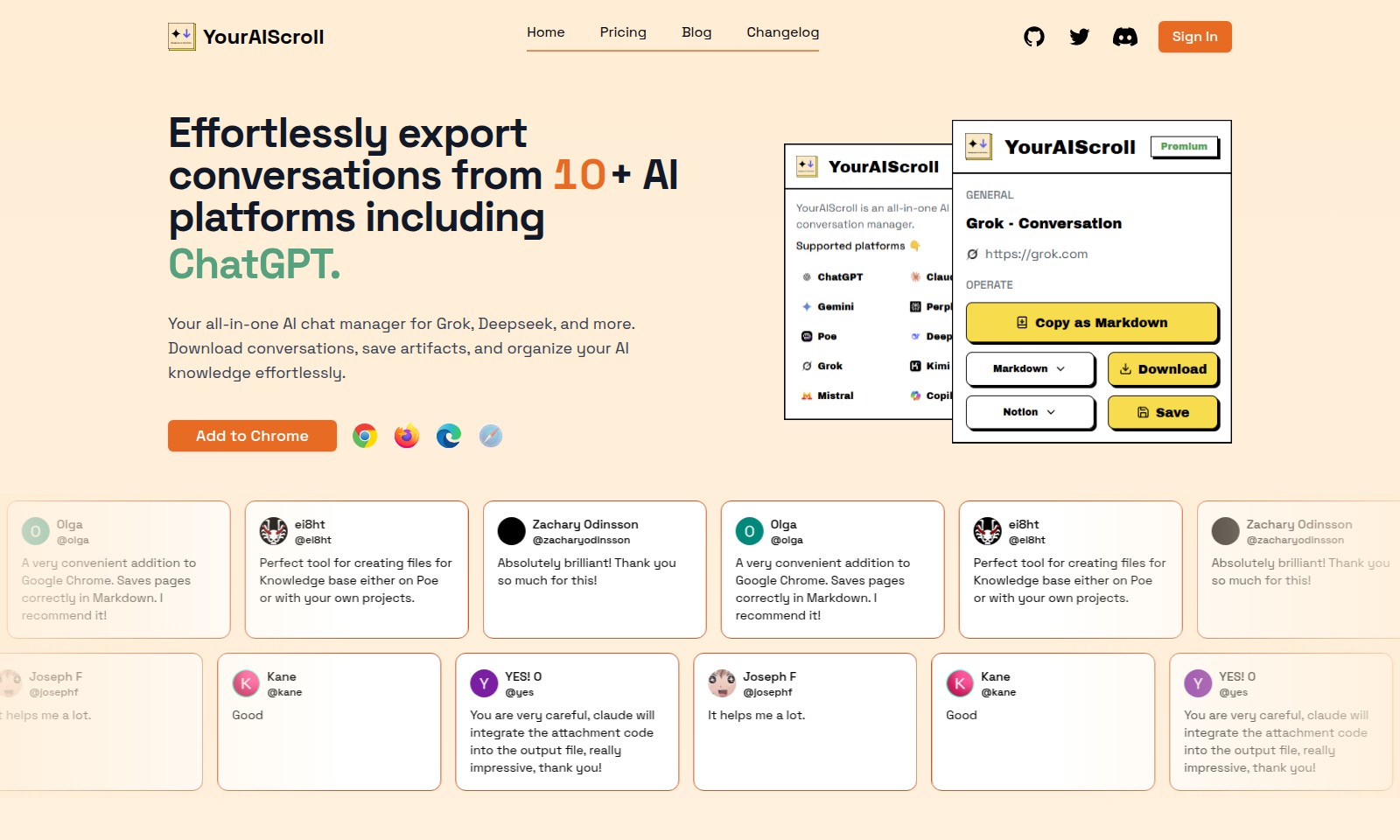
YourAIScroll Introduction
YourAI Scroll: Elevate Your AI Interaction
YourAI Scroll offers a seamless solution for managing conversations from over 10 AI platforms, including ChatGPT. As an all-in-one AI chat manager, it allows you to download conversations, save important artifacts, and effortlessly organize your AI knowledge. With features designed for efficiency and clarity, YourAI Scroll empowers users to streamline their workflows.
YourAIScroll Features
Effortless Conversation Export - Streamline Your Workflow
Export conversations from over 10 AI platforms, including ChatGPT, with just a few clicks. This feature provides users with the ability to collect and manage their AI interactions in one place, enhancing productivity.
Organize Your Knowledge Base - Seamless AI Management
With YourAIScroll, users can effortlessly download and save conversation artifacts, allowing for a well-organized knowledge base that is readily accessible. This capability is essential for users looking to optimize their AI utilization across various platforms.
Chrome Integration - Enhance Browsing Efficiency
Experience the convenience of a Chrome extension that saves pages in Markdown format accurately. This tool allows users to maintain the integrity of their content while facilitating easy transfers to their knowledge bases, which is particularly beneficial for researchers and content creators.
User-Centric Design - Tailored for Your Needs
Designed with user experience in mind, YourAIScroll focuses on the needs of professionals who rely on AI chat interactions. The interface is intuitive, allowing even those with minimal technical expertise to navigate effectively and make the most out of its features.
Multi-Platform Compatibility - Versatile Use Cases
The platform supports multiple AI tools, making it a versatile addition to any professional's toolkit. Whether it's for project management, knowledge discovery, or personal organization, users can depend on YourAIScroll for diverse applications.
Frequently Asked Questions About YourAIScroll
Frequently Asked Questions
1. How can I export conversations from AI platforms?
You can effortlessly export conversations from over 10 AI platforms, including ChatGPT, by using YourAIScroll. Simply connect your account and select the conversations you want to download. The tool allows you to save them in various formats, including Markdown for easy integration into your notes.
2. What is the main benefit of using YourAIScroll?
YourAIScroll serves as an all-in-one AI chat manager, allowing you to gather, organize, and save artifacts from different platforms in one place. This means you can streamline your workflow and keep all valuable information easily accessible without the hassle of switching between tools.
3. Is YourAIScroll compatible with Google Chrome?
Yes! YourAIScroll is designed as a convenient addition to Google Chrome, making it easy to save pages and conversations directly into your browser. The extension ensures that the information is saved correctly in Markdown format, enhancing your ability to manage knowledge efficiently.
4. Can I use YourAIScroll for personal project management?
Absolutely! YourAIScroll is perfect for creating files for a knowledge base, whether for personal projects, educational purposes, or collaborative work. You can customize how you organize and retrieve conversations, making it a versatile tool for various applications.
5. How does YourAIScroll enhance my AI interactions?
By using YourAIScroll, you can keep track of your discussions and insights gained from different AI platforms. This tool allows you to build a comprehensive knowledge archive, enriching your interactions and enabling you to reference past conversations easily.
6. Where can I get more information about updates and features?
Visit our website's blog and changelog sections for the latest updates on features and enhancements. We continually strive to improve YourAIScroll based on user feedback, so check back regularly to make sure you're utilizing all available tools effectively.
How to Use YourAIScroll
Step 1: Sign Up for YourAI
Visit the sign-up page and enter your email address along with a secure password. Click on the registration button to create your account and check your inbox for a confirmation email.
Step 2: Confirm Your Email
Open the confirmation email sent to your inbox and click on the provided link to verify your email address. This step is crucial to activate your account and gain full access to all features.
Step 3: Log In to Your Account
After confirming your email, return to the sign-in page and enter your email and password. Click the 'Sign In' button to access your dashboard.
Step 4: Set Up Your Profile
Once logged in, navigate to the profile settings. Add your name, a profile picture, and any other relevant personal information. This will help personalize your experience on the platform.
Step 5: Connect AI Platforms
Head to the integrations section and connect the AI platforms you wish to manage, like ChatGPT, Grok, and Deepseek. Follow the prompts to link your accounts seamlessly for easy access.
Step 6: Explore Key Features
Now that your profile is set up, explore the platform's main features such as exporting conversations, saving artifacts, and organizing your AI knowledge. Familiarize yourself with the dashboard and available tools to make the most of your experience.
Step 7: Start Exporting Conversations
To export your conversations, select the desired chat from the list, choose the export option, and designate the format you prefer, such as Markdown. This allows you to save important discussions or insights effortlessly.
Step 8: Create a Knowledge Base
Utilize the saved artifacts feature to compile your notes and useful information in a structured manner. This can be particularly helpful for projects or ongoing research.
Step 9: Utilize Additional Tools
Explore other tools offered by YourAI such as templates for project documentation or collaborative features for sharing insights with team members. Take time to learn how each tool can enhance your productivity.
Step 10: Stay Updated
Regularly check the blog and changelog sections for updates and tips on how to maximize your use of the platform. Engage with the community through user feedback and testimonials to learn from others’ experiences.
Reviews
Pros
- Easy to use
- Fast processing
- Great results
- Affordable pricing
Cons
- Limited free version
- Requires internet connection
Comments
No comments yet. Be the first to share your thoughts!
YourAIScroll - Alternative Platforms
For some alternatives to YourAIScroll that you may need, we provide you with sites divided by features.

Falconer provides a unified knowledge platform that improves team efficiency by maintaining organized, accurate documentation and facilitating seamless integrations.
Craft unifies tasks and notes in one flexible workspace, allowing for seamless organization, collaboration, and customization.
Leverage AI to create context-rich outputs from your existing content sources, enhancing marketing and proposal efficiency for startups.
Easy With AI provides a comprehensive collection of AI tools, making it simple for users to find and utilize AI resources for various purposes.