Photo Animate - Photo to Video AI
Photo Animate allows users to easily animate photos to video using AI, creating realistic movements for portraits and cherished memories.
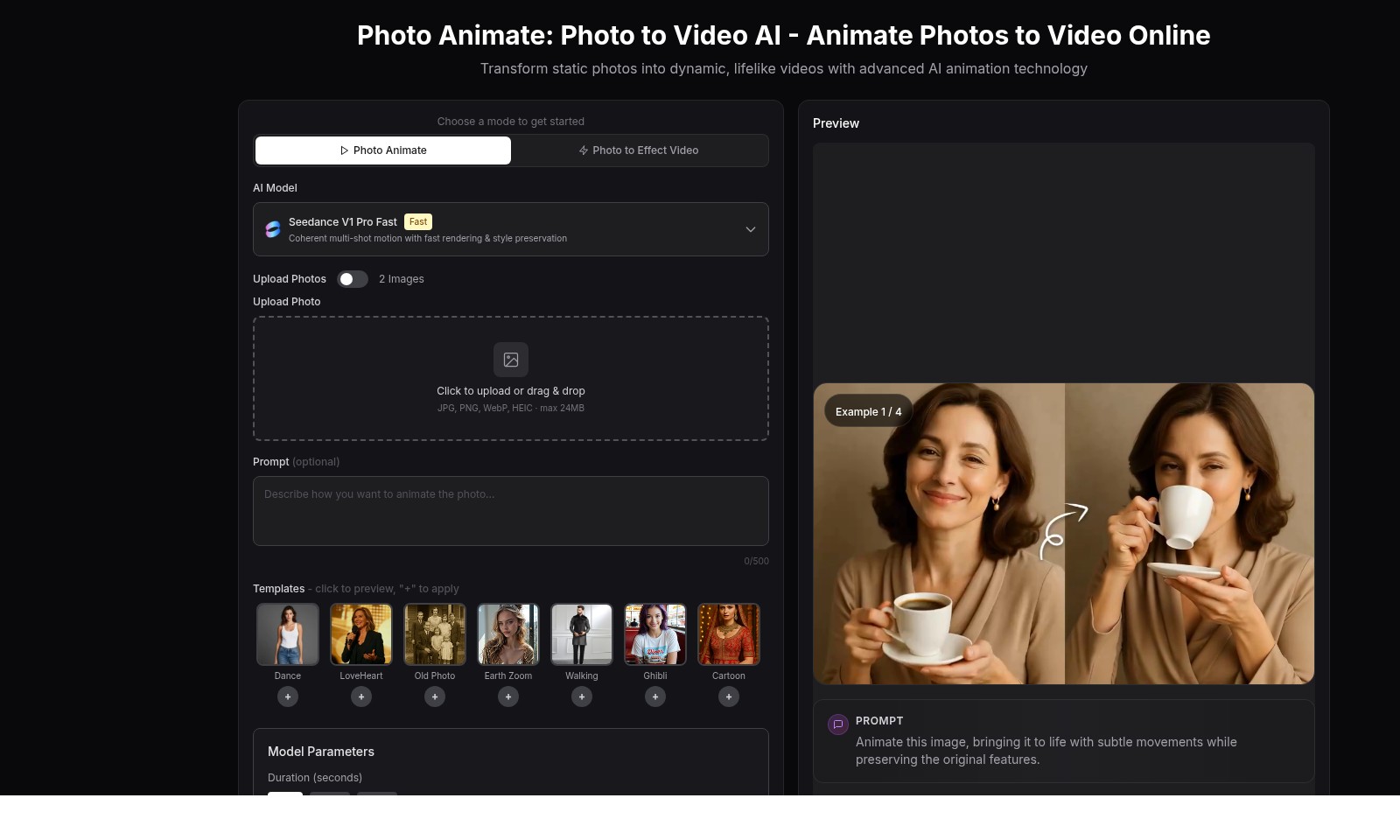
Photo Animate - Photo to Video AI Introduction
Photo Animate: Transform Your Memories into Lifelike Videos
Photo Animate harnesses cutting-edge AI technology to bring your static photos to life, creating dynamic videos that capture the essence of your cherished moments. With a user-friendly interface, this platform allows you to effortlessly convert your images into engaging visual experiences, making it an invaluable tool for anyone looking to enhance their storytelling through animated visuals.
Photo Animate - Photo to Video AI Features
Photo Animate - Transform Static Photos into Engaging Videos
Experience the magic of Photo Animate, where you can effortlessly animate static photos into immersive videos. Our advanced AI animation technology ensures a lifelike transformation that captures the essence of your images.
Photo Animator - Dynamic Video Effects
The Photo Animator feature offers dynamic video effects that add a layer of creativity to your still images. With fast rendering and coherent multi-shot motion, your photos are brought to life in a matter of moments.
Video Tools - Enhance Your Creative Projects
Utilize our comprehensive video tools to enhance your creative projects with ease. Whether you're looking to create engaging content for social media or personal use, our user-friendly interface allows for seamless editing and customization.
Pricing - Affordable Plans for Everyone
Discover pricing options tailored to meet diverse needs. Our flexible plans ensure that users from various backgrounds can take advantage of our advanced animation features without breaking the bank.
Contact - Support When You Need It
Need assistance? Our dedicated support team is just a message away. Whether you have questions about the features, pricing, or technical issues, we’re here to help you make the most out of your Photo Animate experience.
Frequently Asked Questions About Photo Animate - Photo to Video AI
Frequently Asked Questions
Q: What is Photo Animate?
A: Photo Animate is an online tool that transforms static photos into dynamic videos using advanced AI animation technology. This allows users to bring their still images to life with realistic movements.
Q: What file formats do you support for uploads?
A: Our platform supports JPG, PNG, WebP, and HEIC file formats, with a maximum file size of 24MB. Simply upload your chosen images, and let our AI handle the rest.
Q: How long does it take to animate a photo?
A: The animation process typically takes just a few minutes, depending on the complexity of the animations and the rendering settings you choose. You can opt for modes like 'Fast' for quicker results without sacrificing quality.
Q: Can I customize the animation duration and resolution?
A: Yes! You can select different durations (5s, 10s, or 12s) and various resolution options (480p, 720p, and 1080p) to meet your specific needs for the animated video.
Q: What are the available animation templates?
A: We offer a range of fun and innovative templates such as Dance, LoveHeart, Old Photo, Earth Zoom, and more. You can preview these templates before applying them to your photos.
Q: Is there a cost to use Photo Animate?
A: Yes, each animation requires 2 credits, but you can get started easily by signing up and purchasing credits on our pricing page.
How to Use Photo Animate - Photo to Video AI
Register an Account
To begin, visit the Photo Animate website and click on the 'Get Started' button. Fill out the registration form with your email and create a strong password. Confirm your email address through the link sent to your inbox.
Set Up Your Profile
Once registered, log into your account. Navigate to your profile settings and provide basic information. This includes your name and any preferences that enhance your experience. Always save changes to ensure your profile is updated.
Upload Your Photos
To create a video, select the 'Upload Photos' option. You can either drag and drop your images or click to select them from your device. Supported formats include JPG, PNG, WebP, and HEIC, with a maximum size of 24MB for each image.
Choose a Video Mode
After uploading your photos, choose the desired video mode from the given options. You can opt for 'Photo Animate', 'Photo to Effect Video', or select an AI model tailored to your needs. This decision influences the final output of your animated video.
Select Animation Templates
Browse through the available templates for styles like 'Dance', 'LoveHeart', and 'Cartoon'. Click the '+' icon to apply your preferred template to your uploaded images. Templates not only enhance the video but also make it engaging and enjoyable.
Set Your Video Parameters
Adjust important settings such as the video duration (5s, 10s, 12s) and resolution (480p, 720p, 1080p). Choose the aspect ratio that suits your final output. Every choice here defines how your video will be presented.
Animate Your Photo
Once everything is in place, click on the 'Animate Photo' button. This action will utilize your credits to generate the video animation. Wait patiently as the transformation from a still image to a dynamic video takes place.
Preview Your Video
After the animation is complete, you can preview your video. Check for any adjustments or modifications you wish to make. This step is crucial to ensure that the final output meets your expectations.
Download Your Animated Video
Satisfied with your creation? Proceed to download your animated video. Click the 'Download' button and save the file to your device. Share it on social media or keep it for personal use.
Contact Support
If you encounter any issues during this process, don't hesitate to reach out. Use the 'Contact' option to get assistance. Our support team is ready to help you with any questions or concerns.
Reviews
Pros
- Easy to use
- Fast processing
- Great results
- Affordable pricing
Cons
- Limited free version
- Requires internet connection
Comments
No comments yet. Be the first to share your thoughts!
Photo Animate - Photo to Video AI - Alternative Platforms
For some alternatives to Photo Animate - Photo to Video AI that you may need, we provide you with sites divided by features.

Kovvid AI offers a user-friendly platform for generating AI images and videos, with the ability to compare multiple models in one place.
Discover the advanced AI tools at MakeShot.ai for creating stunning videos and images with a limited-time 50% discount.
Image to Video AI allows quick, high-quality video creation from images, integrating with tools like Google Chrome and Figma for seamless workflows.
Discover high-quality free stock videos and AI tools for video and image generation, suitable for both personal and commercial use.