Kuku
Kuku offers a robust Markdown editing experience with AI integration, supporting local files and powerful search capabilities on macOS.
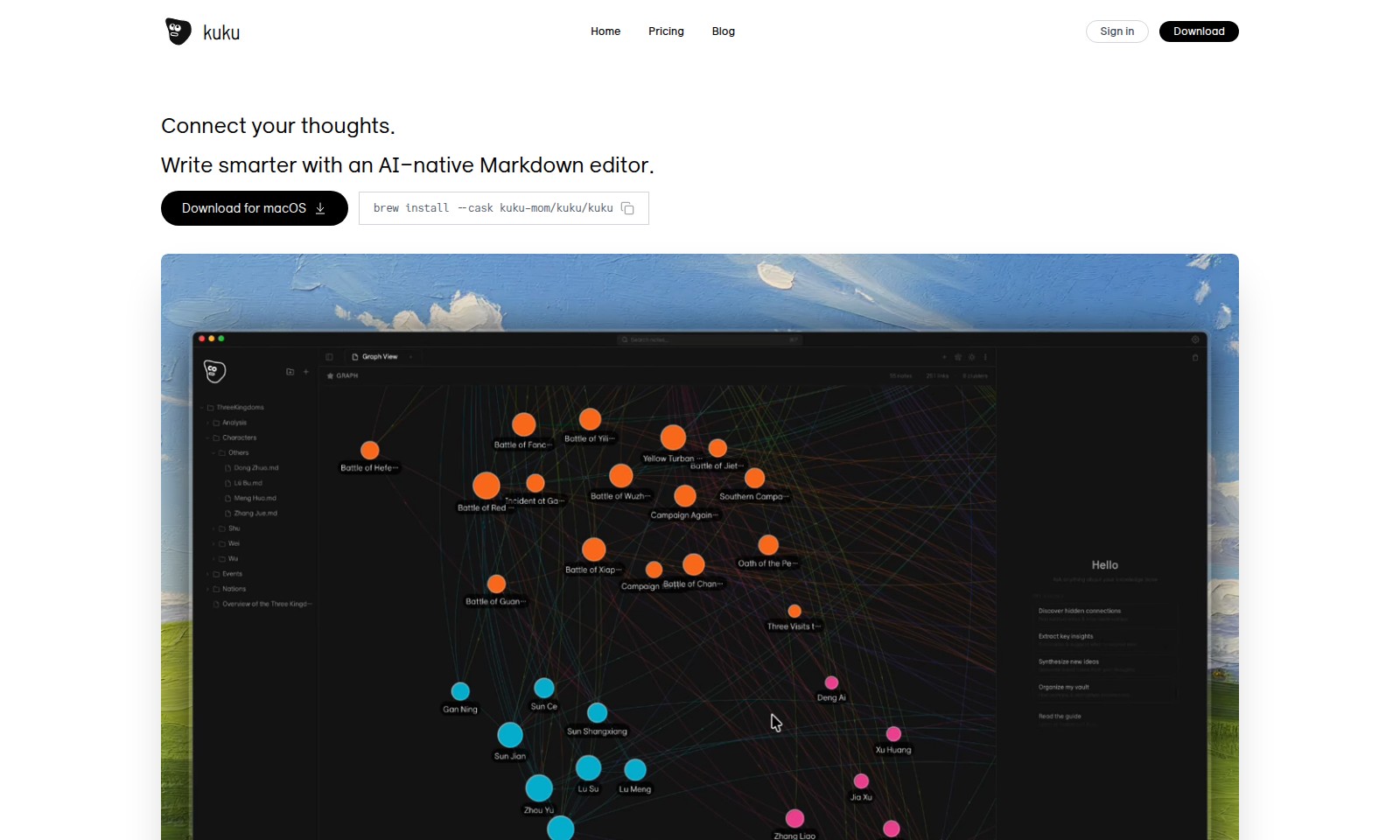
Kuku Introduction
Elevate Your Writing with Kuku
Kuku is a cutting-edge AI-native Markdown editor designed for those who wish to enhance their writing experience. Our platform provides tools that facilitate smarter writing, helping you capture and organize your thoughts effectively.
Kuku Features
Plain Markdown - Core Benefit
Keep your files in simple .md format, ensuring compatibility and ease of access across different platforms. Technical Differentiation Files remain in Markdown format without vendor-specific lock-in, allowing users to easily open them with traditional editors like vim, or integrate them with version control systems like git.
Bidirectional Links - Core Benefit
Enhance your note-taking experience with intuitive linking features that promote seamless navigation and connectivity. Technical Differentiation By simply typing [[, users receive autocomplete suggestions that facilitate instant linking, along with a dedicated panel that showcases all backlinks for better insight into their document relationships.
Graph View - Core Benefit
Visualize the connections between your notes with an interactive graph, helping users to explore ideas and their relationships effectively. Technical Differentiation The force-directed graph displays document connections dynamically, enabling users to click for navigation and drag to explore relationships intuitively.
AI Agent, Not Just Chat - Core Benefit
Experience a transformative approach to note management where AI assists in searching, reading, and creating documents, streamlining the workflow. Technical Differentiation With Gemini's tool-calling capabilities, the AI can search your vault, read files, and even generate new documents based on user commands, akin to having a smart assistant for your notes.
Cursor-style Edit Preview - Core Benefit
Make editing more efficient with a real-time preview of AI-generated edits, ensuring clarity and precision in document revisions. Technical Differentiation Users can view edits highlighted as diffs before applying them, allowing for informed decision-making during the editing process.
Smart Document Handling - Core Benefit
Manage your documents effortlessly within a single editor designed for optimal organization and retrieval. Technical Differentiation Features like tagging and categorizing allow users to sort documents by specific themes or projects, improving overall efficiency and access to information.
Frequently Asked Questions About Kuku
FAQ
Q: What is Kuku and how does it work?
A: Kuku is an AI-native Markdown editor designed to help you write smarter by connecting your thoughts seamlessly. You can install it on macOS via Homebrew and enjoy a plain Markdown experience without any lock-in, giving you full control over your files.
Q: How do I install Kuku on my macOS?
A: You can easily install Kuku by using the Homebrew command: brew install --cask kuku-mom/kuku/kuku. This process will set up everything you need to start using Kuku for your Markdown editing needs.
Q: Can I work on multiple projects with Kuku?
A: Yes! Kuku allows you to maintain multiple Markdown files within your projects folder. You can organize your work by creating different files for various projects and ideas, making collaboration and organization straightforward.
Q: What are bidirectional links in Kuku?
A: Bidirectional links allow you to connect ideas easily by typing [[ which triggers autocomplete for linked documents. This feature helps you navigate and visualize relationships between different notes efficiently.
Q: How does the graph view work?
A: Kuku's graph view displays a force-directed graph that visualizes the connections between your documents. You can click to navigate to specific notes or drag to explore your thoughts visually, enhancing your understanding of how your ideas link together.
Q: What unique features does Kuku offer compared to other editors?
A: Besides standard Markdown editing, Kuku includes an AI agent that can assist you with tasks like searching your vault, reading files, and creating documents based on your requests. This functionality makes Kuku more than just a text editor; it's a powerful tool for managing your notes and ideas.
How to Use Kuku
Step 1: Register for an Account
Begin by navigating to the Kuku homepage. Click on the 'Sign in' button if you already have an account, or select 'Download' to get started with creating a new account. Fill in your information to complete the registration process.
Step 2: Download the Application
Once your account is created, download the Kuku app for macOS. You can use the command line to install it: brew install --cask kuku-mom/kuku/kuku. This will ensure you have the latest version.
Step 3: Set Up Your Profiles
Open the Kuku application and sign in with the account you created. Set up your profile by adding relevant details about your projects and ideas. This will help you organize your work effectively.
Step 4: Create Your First Markdown File
To start using Kuku, create a markdown file in your designated directory. Use the path ~/Documents/kuku/projects/ for project files or ~/Documents/kuku/ideas.md for brainstorming ideas. Simply create a new file with a .md extension.
Step 5: Utilize Bidirectional Links
Enhance your writing by using bidirectional links. Type [[ to get autocomplete suggestions. This feature allows you to link ideas and navigate between them effortlessly. Try linking a note about a meeting to a related project.
Step 6: Visualize Connections with Graph View
Use the Graph View feature to visualize the connections between your documents. It offers a force-directed graph that allows you to click and navigate through your notes. This is particularly useful for understanding complex relationships in your projects.
Step 7: Engage with the AI Agent
Take advantage of the AI capabilities within Kuku. Use commands to summarize your notes or organize your thoughts. For example, type > summarize last week's meeting to retrieve key points from your notes.
Step 8: Edit with Preview
Utilize the Cursor-style Edit Preview feature to see AI edits displayed as diffs before applying changes. This allows you to review proposed edits and decide which changes to implement.
Reviews
Pros
- Easy to use
- Fast processing
- Great results
- Affordable pricing
Cons
- Limited free version
- Requires internet connection
Comments
No comments yet. Be the first to share your thoughts!
Kuku - Alternative Platforms
For some alternatives to Kuku that you may need, we provide you with sites divided by features.

Discover Capacities, a unique platform for organizing thoughts through intuitive objects, enhancing creativity and knowledge management.
Sana provides AI-driven solutions and a learning platform for teams, now part of Workday, focusing on enhancing workplace efficiency and development.
Heptabase empowers users to make sense of complex topics through visual notetaking and collaborative tools, suitable for learning and research.
Dovetail offers a comprehensive platform for transforming customer feedback into actionable insights, enhancing product innovation and collaboration.