FlowSpeech
An AI-powered TTS platform enabling precise emotional speech and multi-voice generation for various projects.
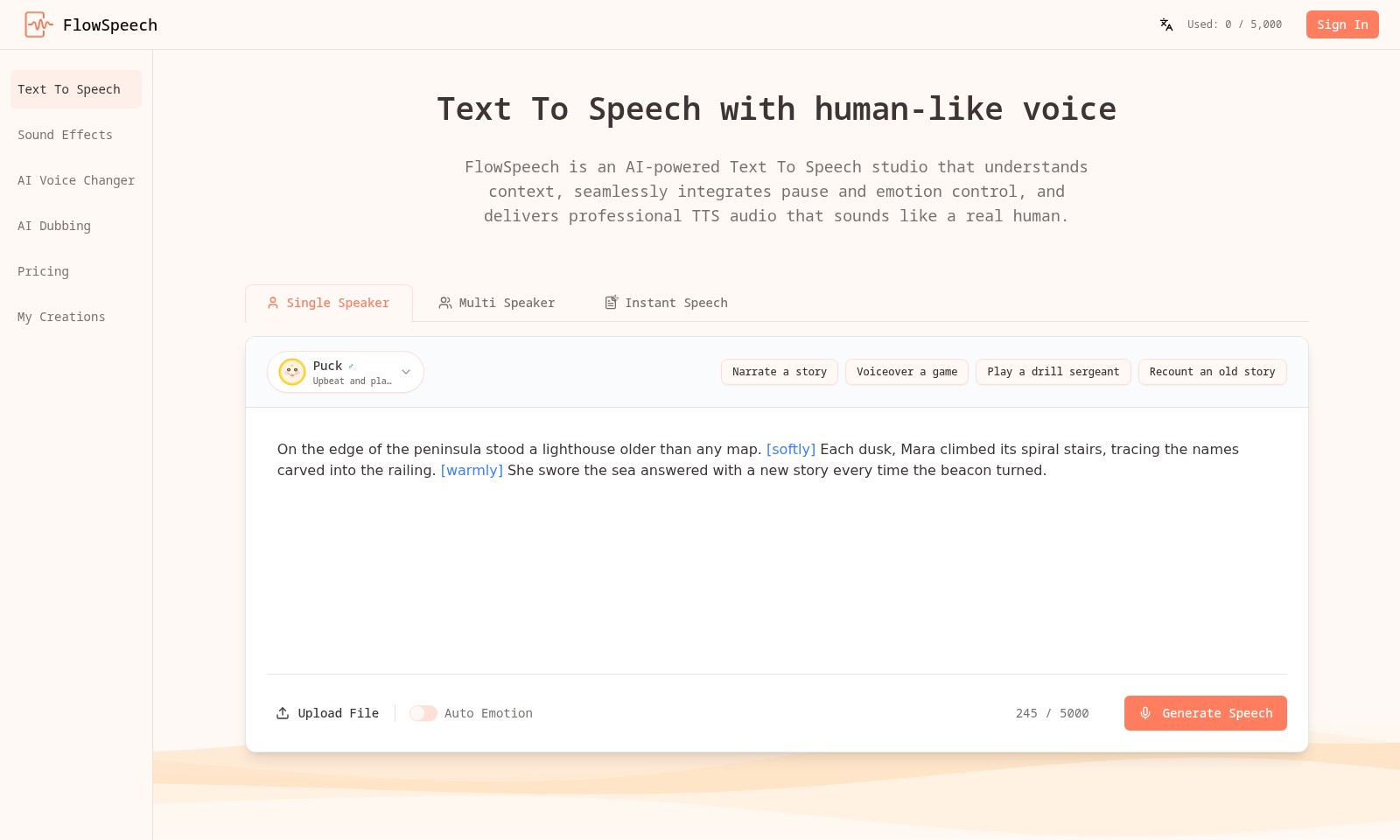
FlowSpeech Introduction
FlowSpeech: Redefining Text-to-Speech Technology
FlowSpeech is an innovative AI-powered Text To Speech studio that revolutionizes the way users convert written text into audio. By harnessing advanced technology, we provide a platform that delivers high-quality, human-like speech, making it ideal for various applications such as storytelling, voiceovers, and more.
FlowSpeech Features
Text to Speech Generator - Instant Human-Like Voice
Effortlessly convert text into speech with a natural flow. Our advanced algorithm ensures that the generated audio closely mimics human intonation, allowing for a more engaging listener experience.
Auto Emotion - Context-Aware Speech Generation
Enhance your audio with a built-in emotion detection system that adjusts tone and pacing based on the underlying sentiment of the text. This feature allows users to convey stories or information with the appropriate emotional weight.
Multi Speaker Capability - Versatile Narration
Support for multiple voices in a single project enables diverse storytelling. This feature is particularly beneficial for content creators who wish to add character differentiation, enriching podcasts, audiobooks, and more.
Instant Speech - Real-Time Audio Production
Generate speech instantly without the typical delays associated with traditional text-to-speech engines. This feature is ideal for situations requiring immediate feedback or audio materials, such as live events or interactive learning.
AI Voice Changer - Adaptive Voice Modulation
Transform your voice recordings with cutting-edge AI voice modulation technology. Users can adapt their audio output to suit different characters or scenarios, enhancing gaming experiences or creative projects.
Frequently Asked Questions About FlowSpeech
FAQs about FlowSpeech
Q: What is FlowSpeech and how does it work?
A: FlowSpeech is an AI-powered Text To Speech (TTS) studio designed to produce human-like voice audio. It utilizes advanced algorithms to understand the context of the text, enabling it to deliver natural-sounding speech with appropriate emotions and pauses.
Q: Can I upload my own files for text-to-speech conversion?
A: Yes, FlowSpeech allows users to upload text files that will be converted into speech. You can simply select the file you wish to convert, and our AI will process it to generate the audio with optimal delivery.
Q: What features are available in FlowSpeech’s TTS service?
A: Our platform offers features such as single and multi-speaker options, instant speech generation, and auto emotion controls. These features allow you to customize and enhance your audio output for various uses, such as storytelling or gaming.
Q: Is it possible to change the voice in my audio?
A: Absolutely! FlowSpeech provides an AI voice changer that allows users to modify the tone, pitch, and style of the voice used in the speech. This can be particularly useful when you want different characters in a story to have distinct voices.
Q: How accurate is the AI in understanding contextual nuances?
A: Our AI is specifically trained to detect and analyze sentiments, timing, and nuances in scripts which allows it to produce TTS outputs that resonate emotionally with listeners, making it sound much more human-like.
Q: What kind of applications can I use FlowSpeech for?
A: FlowSpeech is versatile and can be used for a variety of applications, including narrating stories, voiceover work for games, and even personal projects like reading emails aloud. The possibilities are vast with our TTS technology.
How to Use FlowSpeech
Step 1: Register an Account
To start using FlowSpeech, go to the website and click on the 'Sign In' button. Following that, select the option to create a new account by filling out the required details, such as your email address and a secure password.
Step 2: Verify Your Email
Check your email inbox for a verification email from FlowSpeech. Click on the link provided in that email to confirm your account. This step is crucial to activate your account and ensure security.
Step 3: Sign In
Return to the FlowSpeech website and sign in using your newly created credentials. Enter your email and password in the 'Sign In' fields and press the login button.
Step 4: Set Up Your Profile
Once signed in, navigate to your profile settings. Here, you can add personal information and customize your user preferences. Ensure that your profile is up to date for a personalized experience.
Step 5: Explore the Dashboard
After setting up your profile, take some time to familiarize yourself with the dashboard. Here, you will find tools and options like Text To Speech, Sound Effects, and AI Voice Changer clearly laid out.
Step 6: Use the Text To Speech Feature
To create audio content, select the 'Text To Speech' option. Enter your text into the input field. Choose your desired voice settings such as a single speaker or multi speaker option to generate your audio.
Step 7: Control Tone and Emotion
Use the Auto Emotion feature to add context and emotion to your generated speech. Select from upbeat or soft tones to better suit the narrative style of your project.
Step 8: Save and Share Creations
When you are satisfied with your audio, click the 'Generate Speech' button. Once your speech has been generated, navigate to 'My Creations' where you can save, download, or share your audio files easily with others.
Reviews
Pros
- Easy to use
- Fast processing
- Great results
- Affordable pricing
Cons
- Limited free version
- Requires internet connection
Comments
No comments yet. Be the first to share your thoughts!
FlowSpeech - Alternative Platforms
For some alternatives to FlowSpeech that you may need, we provide you with sites divided by features.

Unleash the potential of voice AI with expressive text-to-speech, voice cloning, and conversational AI designed for creators and enterprises.
Yoodli introduces a comprehensive playbook to enhance sales training and communication skills through AI-driven roleplays.
Experience a wide range of audio stories, roleplays, and guides designed to enrich intimacy and promote personal pleasure.
Delphi enables users to turn their insights into an interactive digital mind, facilitating continuous engagement and knowledge sharing.