ClarityUX
ClarityUX transforms design reviews with predictive analytics, cutting review time and costs while enhancing user experience and usability.
ClarityUX Introduction
Elevate Your Design Process
Unlock the potential of your design efforts with our cutting-edge predictive UX analytics platform. This powerful tool is designed not just to streamline your design workflow, but also to significantly enhance user engagement and conversion rates through insightful analytics and AI-driven feedback.
ClarityUX Features
Boost Conversions with Predictive UX Analytics
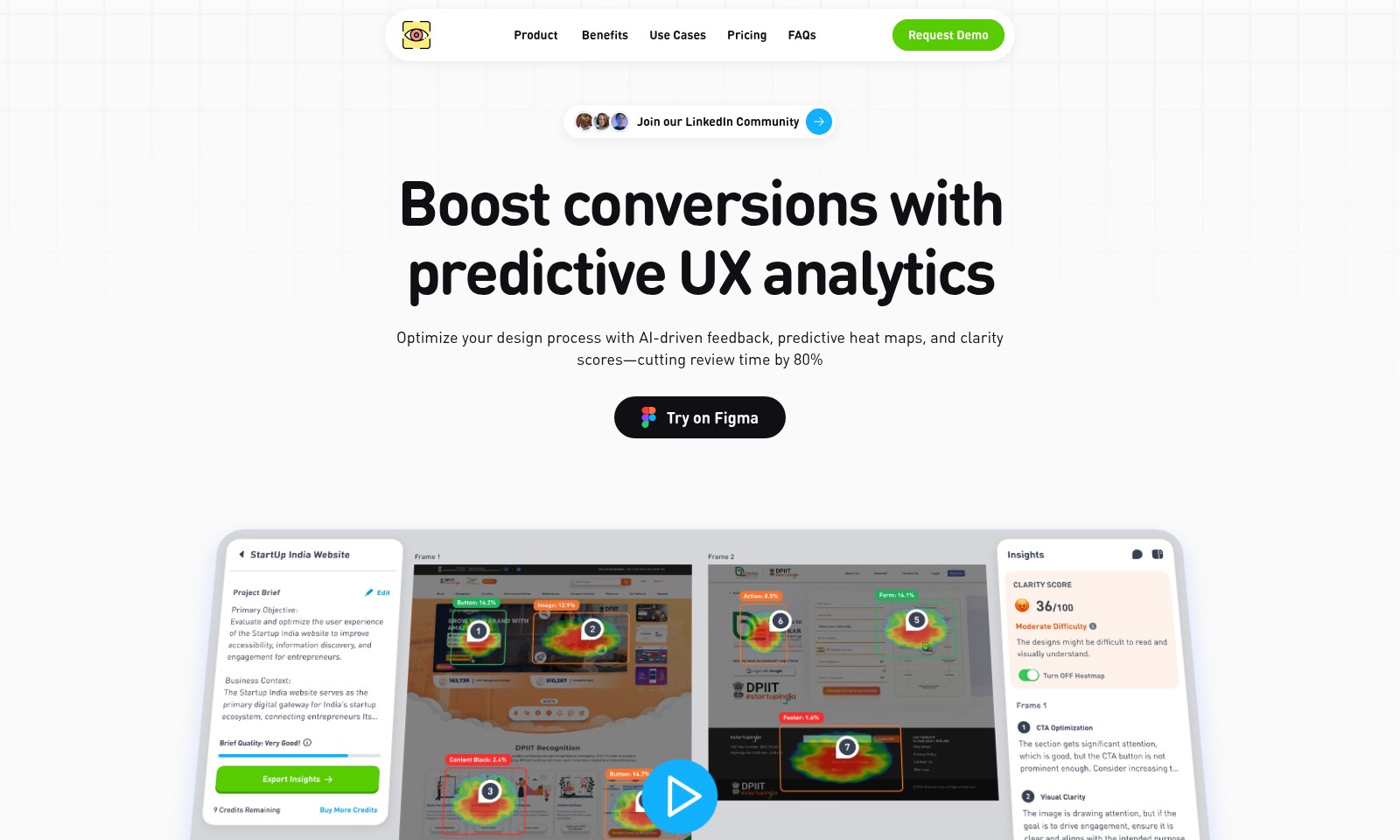
Maximize user engagement and conversion rates through advanced predictive analytics. By utilizing AI-driven feedback and predictive heat maps, our solution significantly reduces design review time by up to 80%, allowing teams to focus more on innovation and less on revisions.
Achieve Design Excellence
Transform your design feedback process with our AI-powered insights. This feature assists in assessing usability, enhancing conversion rates, and making data-supported decisions effortlessly. It's designed for product teams seeking to align design outcomes with key performance indicators (KPIs).
Instant Heuristic Analysis
Obtain critical insights rapidly with our Instant Heuristic Analysis tool. In mere seconds, users receive AI-driven insights, including the CrUX score and WCAG ratings, enabling swift assessments of design accessibility and performance.
Clarity Score
Introducing our proprietary Clarity Score—a unique metric that quantifies design readability, accessibility, and overall user experience. This feature provides valuable insights that help teams refine their designs according to user-centric principles.
Export Detailed Analysis
With just one click, you can generate comprehensive design reports that include both insights and heat maps. Easily export your findings to Figma or download them for further analysis, simplifying the workflow for design teams focused on data-driven evaluations.
Predictive Heat Maps
Utilize predictive analysis capabilities to uncover design usability anomalies. Our predictive heat maps enable teams to optimize layouts based on actual usage patterns, ensuring a user-friendly experience that adapts to users' needs and behaviors.
Frequently Asked Questions About ClarityUX
Frequently Asked Questions
What is predictive UX analytics? Predictive UX analytics is a data-driven approach that utilizes AI to analyze user behavior and design elements. This method helps optimize the design process by identifying potential usability issues before they become problems, ultimately boosting conversion rates.
How does the Clarity Score work? The Clarity Score is a unique metric designed to quantify the readability, accessibility, and overall user experience of your design. It provides a quick reference point to assess how well your design communicates with users.
Can I export my design analysis reports? Yes, you can easily export detailed analysis reports, including insights and heat maps, directly to Figma or download them with just one click. This functionality ensures you have the necessary data to make informed design decisions.
What are predictive heat maps? Predictive heat maps leverage advanced predictive analysis to highlight design anomalies and recommend optimizations. They visualize how users are likely to interact with different elements of your design, helping you make data-backed adjustments to enhance usability.
How can I request a demo? To request a demo, simply visit our website's 'Request Demo' section and fill out the necessary information. Our team will get in touch with you to schedule a convenient time for a comprehensive walkthrough of our services.
Is there a community I can join for more insights? Absolutely! We invite you to join our LinkedIn Community where you can connect with other users, share experiences, and gain additional insights about optimizing your design processes.
How to Use ClarityUX
Register for an Account
To get started, visit the registration page on our website. Fill in your personal details, including your email address and password. Click on 'Create Account' to finalize your registration.
Verify Your Email
After registering, check your inbox for a verification email. Click on the link provided to confirm your email address and activate your account.
Set Up Your Profile
Log in to your account and navigate to your profile settings. Fill in additional information such as your name, job title, and preferences to personalize your experience.
Explore the Dashboard
Once your profile is set up, take a moment to explore the dashboard. Familiarize yourself with the layout and discover where key features are located.
Access Predictive UX Analytics
Click on the 'Analytics' tab in the dashboard. Here, you can view predictive UX analytics that will help you optimize your design process with AI-driven feedback.
Utilize Instant Heuristic Analysis
To make quick assessments of your design, select the heuristic analysis tool. Within seconds, you'll receive insights including CrUX scores and WCAG ratings, allowing you to understand your design's usability.
Generate Design Reports
Visit the 'Reports' section in the dashboard. Select your project and click 'Generate Report'. The AI will analyze your design and provide insights along with heat maps, which you can export to Figma or download for further review.
Join Our Community
Don’t forget to connect with other users! Join our LinkedIn community for networking and sharing experiences, or explore the FAQs for additional support.
Reviews
Pros
- Easy to use
- Fast processing
- Great results
- Affordable pricing
Cons
- Limited free version
- Requires internet connection
Comments
No comments yet. Be the first to share your thoughts!
ClarityUX - Alternative Platforms
For some alternatives to ClarityUX that you may need, we provide you with sites divided by features.

Dart offers innovative AI features for intelligent task management, customizable workspaces, and effective project planning to boost team efficiency.
Explore guest mode benefits, including chat saving and optimized responses through a quick sign-up.
Beam AI is an AI-driven software for accurate takeoff and estimating, helping contractors automate processes and improve bid efficiency.
Discover Clawdbot, a self-hosted AI assistant that manages tasks and integrates with various messaging platforms, with full control over your data.