Loophole
Loophole transforms work efficiency with real-time insights, task automation, and integration with various data sources.
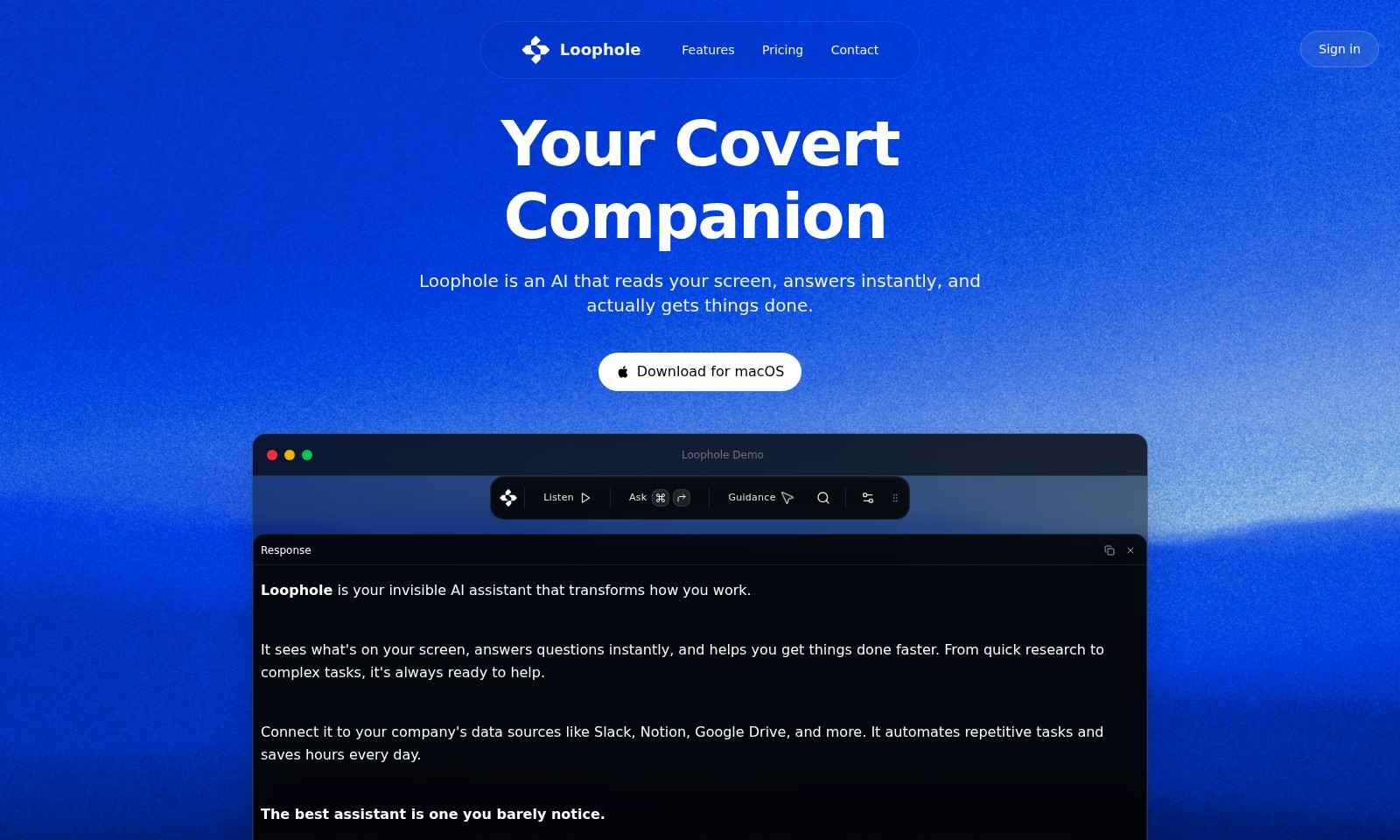
Loophole Introduction
Loophole: Your Invisible AI Assistant
Loophole is an AI that reads your screen, answers instantly, and actually gets things done. As your invisible companion, it transforms how you work by seamlessly integrating into your daily tasks and enhancing productivity.
Loophole Features
Screen Reading - Instant Insights
Loophole's screen reading feature empowers users with instantaneous answers to on-screen queries. It integrates seamlessly with your workflow by listening to everything displayed, providing insights at the moment when they matter most. This real-time comprehension enables professionals to enhance productivity during virtual meetings or when processing information from various data sources.
Automated Task Management - Efficiency Boost
With automated task management, Loophole transforms tedious, repetitive tasks into streamlined processes. Users can connect Loophole to applications like Slack and Google Drive, allowing it to execute commands and notifications without any manual input. This feature can save professionals hours each week, focusing on high-value initiatives rather than mundane tasks.
Multi-Source Integration - Centralized Workflow
Loophole enables integration with diverse data sources, including Notion and Slack. This capability streamlines communication and data flow, allowing users to access information across platforms effortlessly. By centralizing resources, teams can collaborate more effectively, making informed decisions based on real-time data.
Instant Guidance - Enhanced Decision Making
Loophole offers instant guidance based on the context of the user's actions and inquiries. Users receive tailored suggestions and solutions, helping them navigate complex projects efficiently. The feature not only accelerates the decision-making process but also enhances the accuracy of outcomes.
User-Centric Design - Seamless Experience
Designed with user needs in mind, Loophole operates in the background, minimizing disruptions while maximizing assistance. The invisible nature of the assistant means users can engage with technology intuitively, leading to more natural interaction and higher satisfaction levels. By eliminating distractions, professionals can maintain focus on their core responsibilities.
Listening Feature - Contextual Awareness
The listening feature of Loophole tracks discussions and interactions in real-time during meetings or collaborative sessions. By providing context-aware insights, it ensures that users do not miss critical information. This aspect significantly enriches team dynamics and enhances overall productivity by keeping everyone on the same page.
Comprehensive Search Capabilities - Quick Access to Information
Loophole's comprehensive search capabilities allow users to access relevant information swiftly. Whether it's documents in Google Drive or messages in Slack, users can retrieve necessary data with ease, saving time and reducing frustration. This functionality is especially beneficial for professionals who juggle multiple projects and require instant access to resources.
Frequently Asked Questions About Loophole
Frequently Asked Questions
What is Loophole?
Loophole is an innovative AI assistant that reads your screen, answers questions in real-time, and enhances productivity by helping you complete tasks more efficiently.
How does Loophole work?
Loophole operates by analyzing the content displayed on your screen. It provides instant answers and insights based on what it sees, allowing for seamless assistance during various tasks.
Can I integrate Loophole with other tools?
Yes, Loophole can be connected to various data sources such as Slack, Notion, and Google Drive. This integration allows it to automate repetitive tasks and facilitate smoother workflows.
What platforms does Loophole support?
Currently, Loophole is available for macOS and can be used as an extension in Google Chrome. This makes it versatile for users across different devices.
Is there a demo available for Loophole?
Absolutely! You can access a demo of Loophole on our website to see its features in action and understand how it can benefit your workflow.
How does Loophole improve my productivity?
By automating routine tasks and providing instant answers to your queries, Loophole saves you hours each day. Its ability to operate quietly in the background allows you to focus on your work without distractions.
How to Use Loophole
Register Your Account
Begin your journey by visiting the Loophole website and clicking the 'Sign in' button. Fill in your details to create a new account, ensuring that you use a valid email address to receive verification.
Verify Your Email
After registration, check your inbox for a verification email from Loophole. Click the link provided to confirm your email and activate your account. This step is crucial for securing your account and enabling full access to features.
Set up Your Profile
Log in to your new account and go to your profile settings. Here, you can customize your display name, set a profile picture, and adjust your notification preferences. Personalizing your profile will enhance your user experience.
Connect Your Data Sources
To maximize Loophole’s capabilities, connect it to your business tools. Navigate to the integrations section and choose from platforms like Slack, Notion, and Google Drive. Follow the prompts to authorize access and integrate them seamlessly with your account.
Familiarize Yourself with the Interface
Take a moment to explore the Loophole dashboard. Familiarize yourself with key features such as the screen reading tool, response options, and automation settings. Understanding the layout will help you work more efficiently.
Use the Screen Reading Feature
To start utilizing the core functionality of Loophole, activate the screen reading feature. It will read and interpret the content on your screen in real time. Ask questions about your documents or during meetings to get instant information or summaries.
Automate Repetitive Tasks
Identify tasks that you perform frequently and set them up for automation within the Loophole platform. Use the automation settings to create workflows that save you time and reduce manual effort. Take advantage of suggestions for common tasks based on your activity.
Seek Help and Support
If you encounter any challenges, don’t hesitate to access the support section. Loophole provides a comprehensive FAQ and customer support options to assist you. You can reach out for personalized help if needed.
Explore Advanced Features
Once you're comfortable with the basics, explore advanced features that enhance productivity. Investigate how Loophole integrates with other apps and the types of complex tasks it can handle, such as project management assistance and detailed data analysis.
Provide Feedback
As a new user, your feedback is invaluable. Share your experiences directly through the platform or via email to the support team. Your insights can help improve Loophole for everyone.
Reviews
Pros
- Easy to use
- Fast processing
- Great results
- Affordable pricing
Cons
- Limited free version
- Requires internet connection
Comments
No comments yet. Be the first to share your thoughts!
Loophole - Alternative Platforms
For some alternatives to Loophole that you may need, we provide you with sites divided by features.

Dart offers innovative AI features for intelligent task management, customizable workspaces, and effective project planning to boost team efficiency.
Explore guest mode benefits, including chat saving and optimized responses through a quick sign-up.
Beam AI is an AI-driven software for accurate takeoff and estimating, helping contractors automate processes and improve bid efficiency.
Discover Clawdbot, a self-hosted AI assistant that manages tasks and integrates with various messaging platforms, with full control over your data.