Adobe Podcast
Adobe Podcast offers AI-driven tools for recording, editing, and enhancing audio seamlessly online.
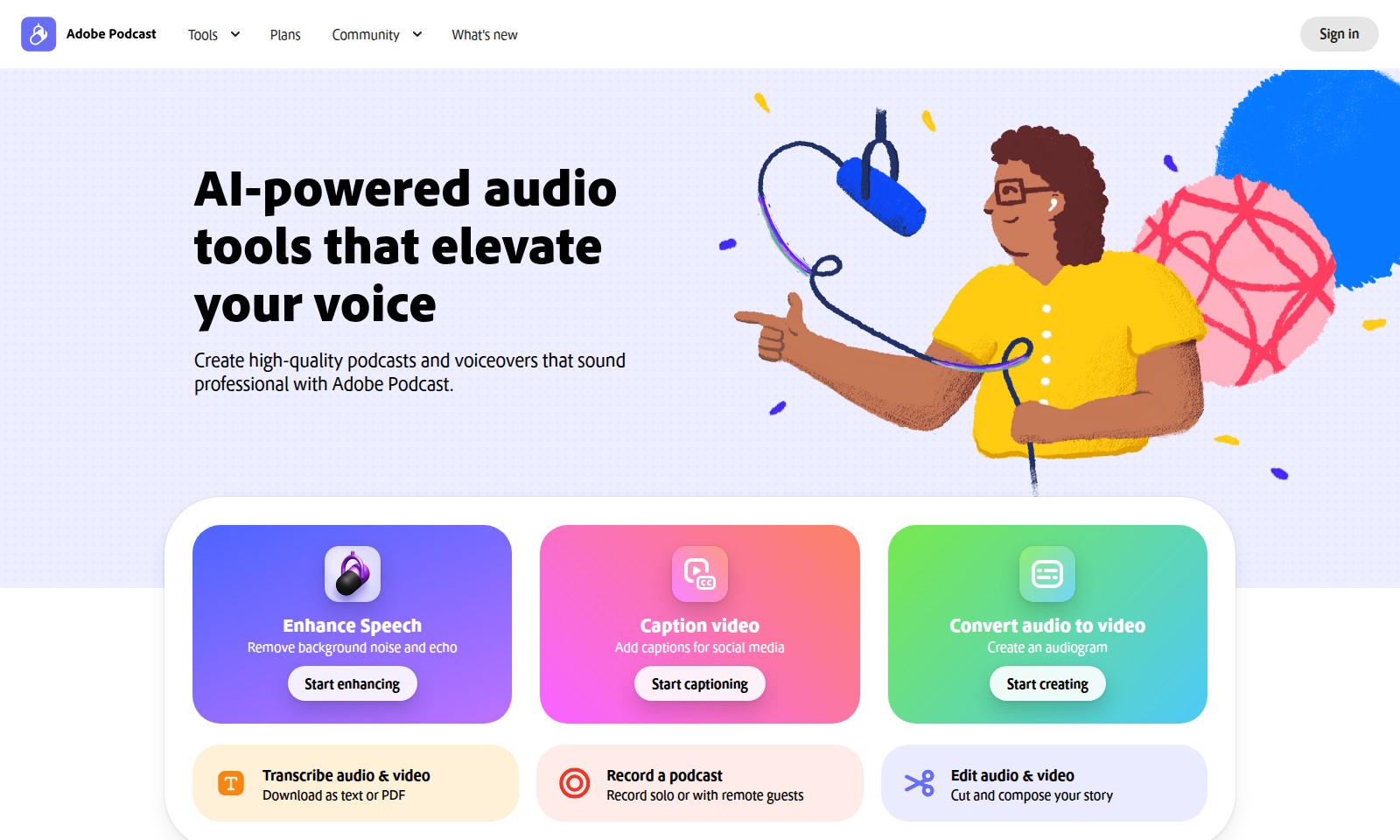
Adobe Podcast Introduction
Elevate Your Voice with AI-Powered Tools
Adobe Podcast offers a suite of advanced audio tools designed to transform your voice recordings into professional-quality podcasts and voiceovers. With our platform, you can effortlessly enhance your spoken audio, ensuring it captures the attention of your audience and conveys your message with clarity and impact.
Adobe Podcast Features
Feature: AI-Powered Audio Tools - Elevate Your Voice with Professional Quality
With Adobe Podcast, users can easily create high-quality podcasts and voiceovers that rival professional recordings. The platform leverages advanced AI technology to enhance audio clarity and richness, making it ideal for budding podcasters and content creators looking for a cost-effective solution.
Feature: Background Noise Removal - Clearer Sound Experience
The background noise and echo removal feature allows users to focus on the content of their podcasts or voiceovers without distractions. This technical differentiation ensures that even recordings made in less-than-perfect environments can sound polished and listener-friendly.
Feature: Video Captioning - Engaging Social Media Content
Automatically add captions to your videos for social media use. This feature enhances accessibility and ensures that your message reaches a wider audience, catering to the needs of creators who prioritize engagement across multiple platforms.
Feature: Audio-to-Video Conversion - Visualize Your Sound
Transform your audio recordings into engaging audiograms that are perfect for social sharing. This not only aids in promoting your audio content but also helps creators visually represent their ideas in a compelling way, bridging the gap between audio and visual media.
Feature: Audio Transcription - Instant Text Conversion
With the audio and video transcription feature, users can convert spoken content into text or PDF formats. This capability is valuable for content repurposing and increases the discoverability of your podcasts by offering written content alongside audio.
Feature: Seamless Recording and Editing - User-Friendly Interface
Record solo or collaborate with remote guests, all within Adobe Podcast. The platform’s browser-based interface allows for seamless recordings and intuitive editing without the need to download any software. This provides flexibility and convenience for users, making content creation more accessible than ever.
Frequently Asked Questions About Adobe Podcast
FAQs about Adobe Podcast
Q1: How does Adobe Podcast help enhance audio quality?
Adobe Podcast uses AI technology to remove background noise and echo, ensuring your voice recordings sound professional. With just one click, you can enhance the audio quality of your recordings, making them suitable for podcasts, lectures, or any audio content.
Q2: Can I create a podcast directly in the browser?
Yes! Adobe Podcast allows you to record, edit, and enhance your voice without downloading any software. You can easily access all the tools you need right in your web browser, making it convenient to create high-quality podcasts and voiceovers.
Q3: What features are available for captioning videos?
Adobe Podcast provides the ability to add captions for social media videos effortlessly. This feature helps in making your content more accessible and engaging for viewers who might be watching without sound.
Q4: How can I transcribe my audio and video files?
You can transcribe your audio and video files easily and download them as text or PDF. This feature is particularly useful for creating scripts, outlines, or written records of your audio content.
Q5: Are there any project templates available?
Absolutely! Adobe Podcast offers several starter projects, including true crime podcasts, class lectures, and more. These templates help you to get started quickly and inspire your own unique podcasting ideas.
Q6: Is there a community or support for Adobe Podcast users?
Yes, there is a vibrant community of Adobe Podcast users. You can connect with other creators, share your experiences, and seek assistance through various forums and support channels provided by Adobe.
How to Use Adobe Podcast
Step 1: Register an Account
To get started, visit the Adobe Podcast website and click on the 'Sign in' button. If you don't have an account, follow the prompts to create one. Make sure to use a valid email address for registration.
Step 2: Set up Your Profile
Once registered, log in and navigate to your profile settings. Fill in your personal information and customize your profile to reflect your interests and voice. This helps tailor the experience to your needs.
Step 3: Explore the Tools
Now that your profile is set up, take some time to familiarize yourself with the various tools available. Adobe Podcast offers features such as audio enhancement, captioning, and audio-to-video conversion that you can explore.
Step 4: Start Your First Project
Select a project type that interests you, such as a podcast or an audiogram. Click on 'Jump into a project' and choose your desired format to get started.
Step 5: Record Your Audio
If you're creating a podcast, use the recording tool to capture your voice. You can either record solo or invite remote guests to join. Ensure you find a quiet space to minimize background noise.
Step 6: Enhance Your Audio
After recording, utilize the AI-powered enhancement tools to remove background noise and echo. With just one click, you can make your recordings sound as if they were done in a professional studio.
Step 7: Add Captions
For those creating video content or audiograms, don't forget to add captions. This feature is vital for social media engagement and helps make your content accessible to all audiences.
Step 8: Edit Your Content
Use the editing tools to cut and compose your audio story. You can trim sections, add effects, and organize your content seamlessly before finalizing your project.
Step 9: Download Your Finished Product
Once you're satisfied with your edits, download your project as text, PDF, or audio/video format. This allows you to share it across platforms or save it for your records.
Step 10: Engage with the Community
Finally, consider joining the Adobe Podcast community. Engage with fellow creators to share tips, seek feedback, and explore new ideas. Stay updated on what's new by regularly checking the community sections.
Reviews
Pros
- Easy to use
- Fast processing
- Great results
- Affordable pricing
Cons
- Limited free version
- Requires internet connection
Comments
No comments yet. Be the first to share your thoughts!
Adobe Podcast - Alternative Platforms
For some alternatives to Adobe Podcast that you may need, we provide you with sites divided by features.

SAM Audio leverages AI to provide seamless audio separation, making it ideal for music production, podcasting, and sound design.
Voicemaker transforms text into human-like speech, enabling creators to produce voiceovers easily for diverse applications.
This webpage offers a free online audio converter that supports over 300 formats, allowing users to convert and extract audio from video files securely.
TurboScribe offers unlimited audio and video transcription with advanced features like speaker recognition, translations, and high accuracy.