Voicemaker
Voicemaker transforms text into human-like speech, enabling creators to produce voiceovers easily for diverse applications.
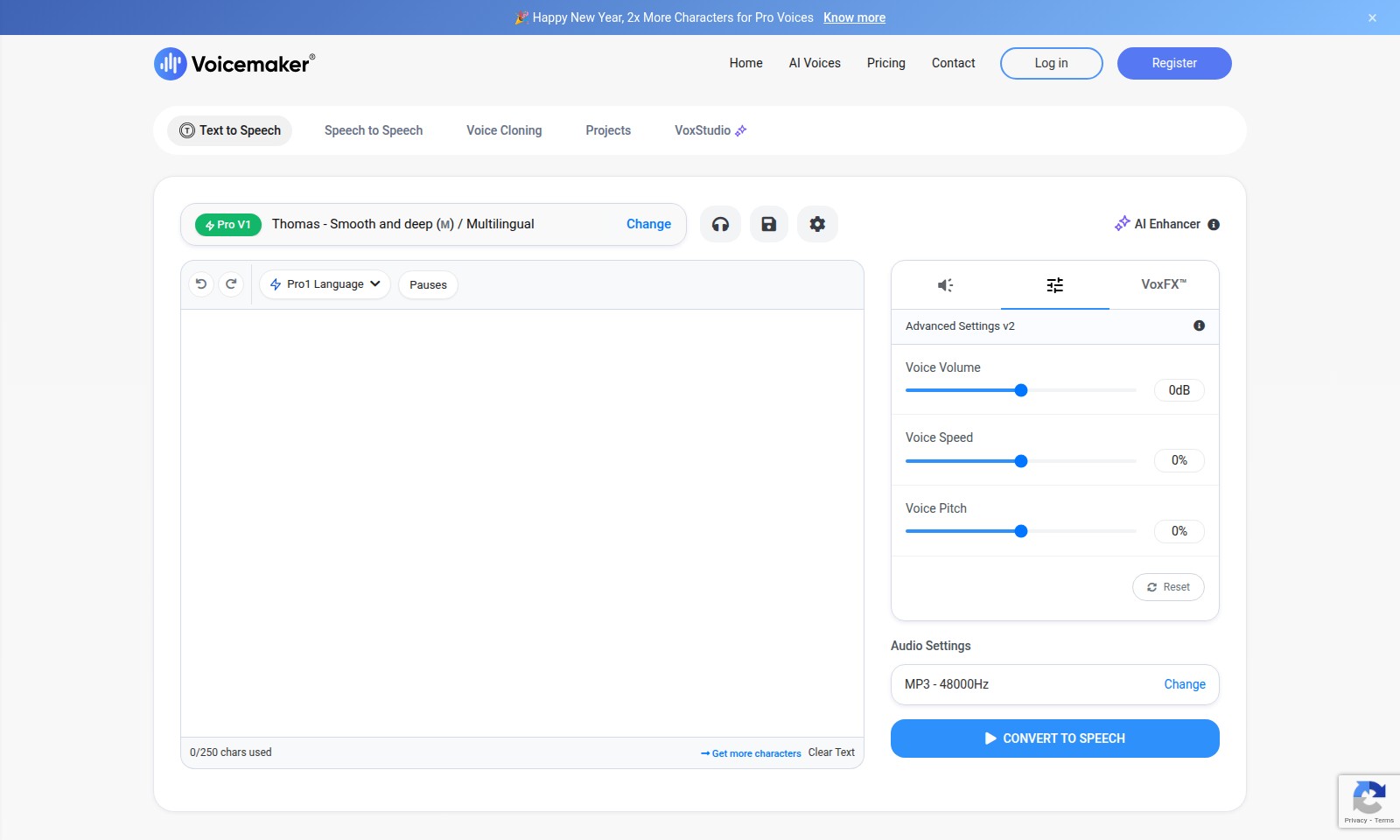
Voicemaker Introduction
Voicemaker: Your Ultimate Solution for High-Quality Audio Generation
Voicemaker stands out as a premier platform for creating professional-grade audio content. With AI-powered voice generation, we offer a versatile suite of tools that cater to a wide range of applications, from audiobooks and podcasts to dynamic YouTube videos and e-learning materials. Whether you're a brand, educator, or content creator, our platform is designed to elevate your audio experience, ensuring that your messages are delivered with clarity and impact.
Voicemaker Features
Text to Speech - Enhance Communication
Experience the power of AI-driven text to speech with Voicemaker, designed to enhance your communication across various platforms. This feature offers lifelike voices that can be utilized in multiple languages, making it perfect for global outreach.
Speech to Speech - Effortless Conversations
Transform spoken words into engaging dialogues seamlessly with our speech to speech functionality. This tool is engineered for fast and reliable conversion, ensuring that your conversations are clear and impactful.
Voice Cloning - Personalize Your Brand
Create a unique audio identity with our voice cloning technology, allowing you to replicate voices for consistent branding. This feature targets businesses seeking to build a recognizable tone in their marketing materials.
Projects - Streamlined Workflow
Organize and manage your audio projects effortlessly within the Voicemaker platform. Tailored for professionals, this feature allows for collaboration and efficient management of multiple projects simultaneously.
VoxFX™ - Customized Audio Experience
Elevate your audio output with VoxFX™, enabling users to fine-tune aspects like volume, pitch, and speed. This differentiation allows creatives to achieve their desired sound quality efficiently.
Frequently Asked Questions About Voicemaker
Frequently Asked Questions
What is Voicemaker and how can it help me?
Voicemaker is a trusted tool designed to convert text into speech with high-quality AI voices. It can be used for various applications such as audiobooks, video narration, and e-learning materials.
Can I use the generated audio files for commercial purposes?
Yes, you can redistribute the audio files that you create with Voicemaker even after your subscription expires, making it an excellent choice for businesses and content creators.
What types of projects can benefit from using Voicemaker?
Voicemaker is versatile and can support a range of projects, including YouTube videos, sales and social media content, and call centers. Its capabilities make it suitable for both personal and professional use.
How does the voice cloning feature work?
The voice cloning feature allows users to create a custom voice based on their own or any other target voice. This feature can produce unique, personalized content that stands out in your projects.
Are there any limitations to the Voicemaker service?
While there are various subscription plans available that offer different features, all users can access essential functionalities. The key limitations may include character limits and features available based on the plan chosen.
How is Voicemaker integrated into existing platforms?
Voicemaker audio files can easily be shared across multiple platforms, ensuring that you can distribute your content wherever it’s needed, thus enhancing your project's reach and impact.
How to Use Voicemaker
Step 1: Register an Account
Visit the registration page and fill in your personal details, including your email and a secure password. Confirm your email address by clicking the verification link sent to your inbox.
Step 2: Set up your Profile
Once verified, log in and complete your profile. Add your name, preferred settings, and any other relevant information to enhance your user experience.
Step 3: Explore Pricing Plans
Navigate to the pricing section to review the various plans available. Choose a plan that fits your needs based on your use cases like AI Voices, Text to Speech, or Voice Cloning.
Step 4: Subscription Confirmation
After selecting a plan, proceed to the payment page. Enter your payment details and confirm your subscription to gain access to premium features.
Step 5: Learn the Interface
Familiarize yourself with the dashboard. Take a tour of the site to understand where to find key features like Text to Speech, Speech to Speech, and VoxStudio.
Step 6: Create Your First Project
Start a new project by selecting your desired feature. For instance, choose Text to Speech if you want to create audio from text. Input your text and select voice preferences.
Step 7: Adjust Audio Settings
Use the Audio Settings feature to modify volume, speed, and pitch. Play around with the options to find the perfect sound for your project.
Step 8: Generate Audio
Click the 'Convert to Speech' button to generate your audio file. Review the output and make any necessary changes before finalizing.
Step 9: Share Your Work
Once satisfied with your audio file, use the sharing options to distribute it across platforms. You can also download it for offline use or upload it directly to your projects.
Step 10: Explore Advanced Features
Dive deeper by exploring additional features like Voice Cloning or VoxFX™ to enhance your projects further. Don’t hesitate to check the support section for tutorials and tips.
Reviews
Pros
- Easy to use
- Fast processing
- Great results
- Affordable pricing
Cons
- Limited free version
- Requires internet connection
Comments
No comments yet. Be the first to share your thoughts!
Voicemaker - Alternative Platforms
For some alternatives to Voicemaker that you may need, we provide you with sites divided by features.

SAM Audio leverages AI to provide seamless audio separation, making it ideal for music production, podcasting, and sound design.
This webpage offers a free online audio converter that supports over 300 formats, allowing users to convert and extract audio from video files securely.
Adobe Podcast offers AI-driven tools for recording, editing, and enhancing audio seamlessly online.
TurboScribe offers unlimited audio and video transcription with advanced features like speaker recognition, translations, and high accuracy.