Wav2Lip
Wav2Lip leverages AI technology to generate high-quality, lip-synced videos quickly and easily, catering to creators, educators, and developers.
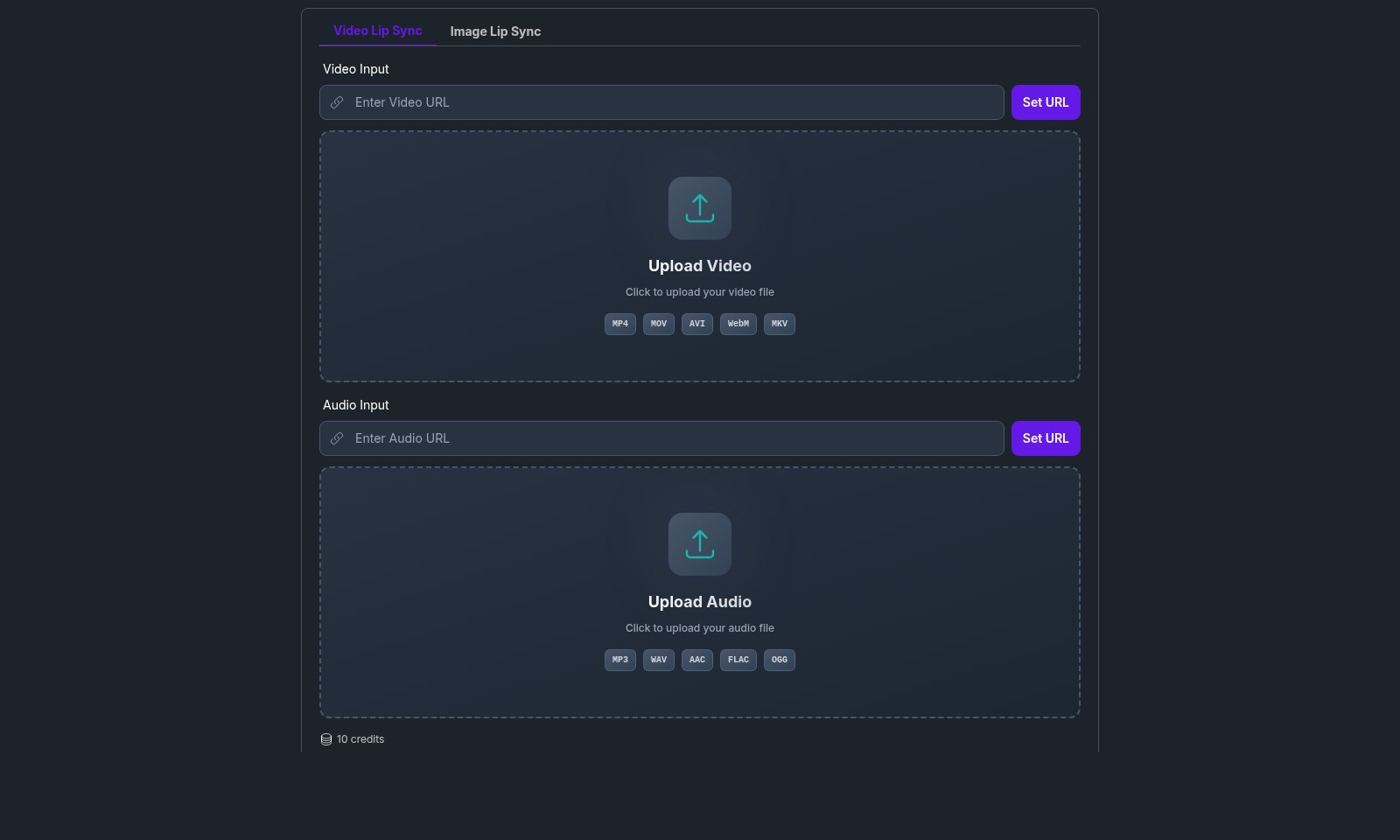
Wav2Lip Introduction
Wav2Lip: Your Go-To Tool for Realistic Lip Sync Videos
Wav2Lip is an innovative platform that enables users to create stunning lip-synced videos effortlessly. Harnessing cutting-edge AI technology, our tool accurately synchronizes video footage with any audio input, ensuring high-quality and realistic animations. Whether for personal projects, professional presentations, or social media content, Wav2Lip offers a seamless experience to bring your ideas to life.
Wav2Lip Features
Wav2Lip - Create Realistic Lip-Synced Videos
Transform your audio into visually engaging lip-synced videos effortlessly. Our tool uses advanced AI to synchronize lip movements with audio inputs, ensuring a natural and realistic outcome. Technical Differentiation: Powered by cutting-edge AI algorithms, Wav2Lip achieves near-perfect lip synchronization across diverse video formats including MP4, MOV, and more.
Free Playground - Experiment at No Cost
Get started without any investment. Our free playground allows users to explore Wav2Lip's features without limits. Experience the ease of lip synchronization without the worry of financial commitment. Technical Differentiation: Access a full range of functionalities in our free version, including video and audio uploads in various popular formats such as MP3, WAV, and FLAC.
AI Music Generator - Enhanced Creative Potential
Unlock your creative potential by integrating music into your lip-synced videos. Our AI music generator provides users with tailored soundscapes, enriching the overall experience of their visual projects. Technical Differentiation: This feature leverages deep learning techniques to create original soundtracks that fit seamlessly with the generated lip-synced videos, enhancing viewer engagement.
Video Lip Sync & Image Lip Sync - Versatile Sync Options
Whether you’re working with video or static images, Wav2Lip offers both video and image lip syncing capabilities. Suitable for various creative applications, from professional video productions to personal projects. Technical Differentiation: Our dual-mode synchronization allows for flexibility in content creation, enabling users to upload video files or images effortlessly for immediate processing.
User-Centric Interface - Streamlined Experience
Designed with users in mind, our interface simplifies the lip-syncing process. Users can quickly upload their video and audio files, making the entire experience intuitive and efficient. Technical Differentiation: The drag-and-drop feature allows easy file uploads and minimizes setup time, so users can focus on their creative projects rather than technical hurdles.
Robust Support - Always There to Assist
Benefit from responsive customer support to guide you through any questions or technical challenges. We prioritize user experience and strive to ensure your every inquiry is addressed promptly. Technical Differentiation: Access to our support team 24/7 guarantees that assistance is readily available, ensuring seamless project execution at any time of day.
Frequently Asked Questions About Wav2Lip
FAQs for Wav2Lip
What is Wav2Lip?
Wav2Lip is a cutting-edge lip sync tool that enables users to create realistic talking videos using audio tracks. The platform allows you to easily generate high-quality lip-synced animations instantly by uploading videos and audio files.
How do I use the Wav2Lip tool for free?
To use Wav2Lip for free, simply access the online tool on our website. You can upload your video files in popular formats like MP4 or AVI, and your audio files in formats like MP3 or WAV.
What file formats are supported for video and audio uploads?
Wav2Lip supports a variety of file formats for both video and audio uploads. You can upload video files in MP4, MOV, AVI, WebM, and MKV formats, while audio files can be in MP3, WAV, AAC, FLAC, and OGG formats.
How many credits do I need to generate a lip-synced video?
Generating a lip-synced video with Wav2Lip requires 10 credits. Credits are used to ensure optimal use of our platform, and users can get started for free to explore its capabilities.
Can Wav2Lip help me create lip-synced videos for professional purposes?
Absolutely! Wav2Lip is designed for both personal and professional use. The tool's ability to create lifelike animations can enhance projects such as presentations, marketing videos, and social media content, making it an excellent choice for creators and professionals alike.
Are there any limitations to using the free version of Wav2Lip?
While Wav2Lip provides a free version, there may be limitations on video length or the number of videos you can generate in a specific time. For unlimited access and advanced features, consider our pricing plans, which are designed to accommodate various user needs.
How to Use Wav2Lip
Register for an Account
Visit the Wav2Lip website and click on 'Get Started -- It's Free' to initiate your registration. Fill in the necessary details such as your email and create a password to complete your registration.
Verify Your Email
Check your inbox for a verification email from Wav2Lip. Click on the verification link provided in the email to confirm your account and unlock all features.
Set Up Your Profile
Once logged in, navigate to your profile settings. Fill in any additional required information to personalize your experience and keep your data updated.
Choose Your Project Type
Decide whether you want to create a lip-synced video from a video file (Video Lip Sync) or an image (Image Lip Sync). Select the appropriate option in the dashboard to proceed.
Upload Your Video or Image
Click the 'Upload Video' or 'Upload Image' button. Select files from your device that are in the supported formats: MP4, MOV, AVI, WebM, MKV for videos, and appropriate image formats for images.
Upload Your Audio Track
Following your video upload, click on 'Upload Audio'. Choose your audio file from your device. Supported formats include MP3, WAV, AAC, FLAC, OGG. Ensure your audio matches the length of your video for the best results.
Generate Your Lip-Synced Video
After uploading both your video/image and audio, click on the 'Generate' button. The software will process your files and create a lip-synced video. This process might take a few moments depending on file sizes.
Preview and Download Your Video
Once generation is complete, you can preview your lip-synced video. If satisfied, download the final product to your device. If adjustments are needed, repeat the upload and generation steps with new files.
Reviews
Pros
- Easy to use
- Fast processing
- Great results
- Affordable pricing
Cons
- Limited free version
- Requires internet connection
Comments
No comments yet. Be the first to share your thoughts!
Wav2Lip - Alternative Platforms
For some alternatives to Wav2Lip that you may need, we provide you with sites divided by features.

Yevideo is an all-in-one platform for AI-generated videos and images, offering various models for enhanced creativity and efficiency.
Easily generate dancing pet videos or GIFs by uploading photos and choosing templates, perfect for social media sharing.
Pixalice offers a powerful AI tool for generating high-quality images and videos from text or photos, featuring a vast style library and user-friendly interface.
MojoMake offers advanced AI tools for video and image creation, providing commercial rights and professional quality, all in one platform.