Weavy
Weavy combines AI capabilities and human creativity to enhance artistic workflows with powerful editing tools.
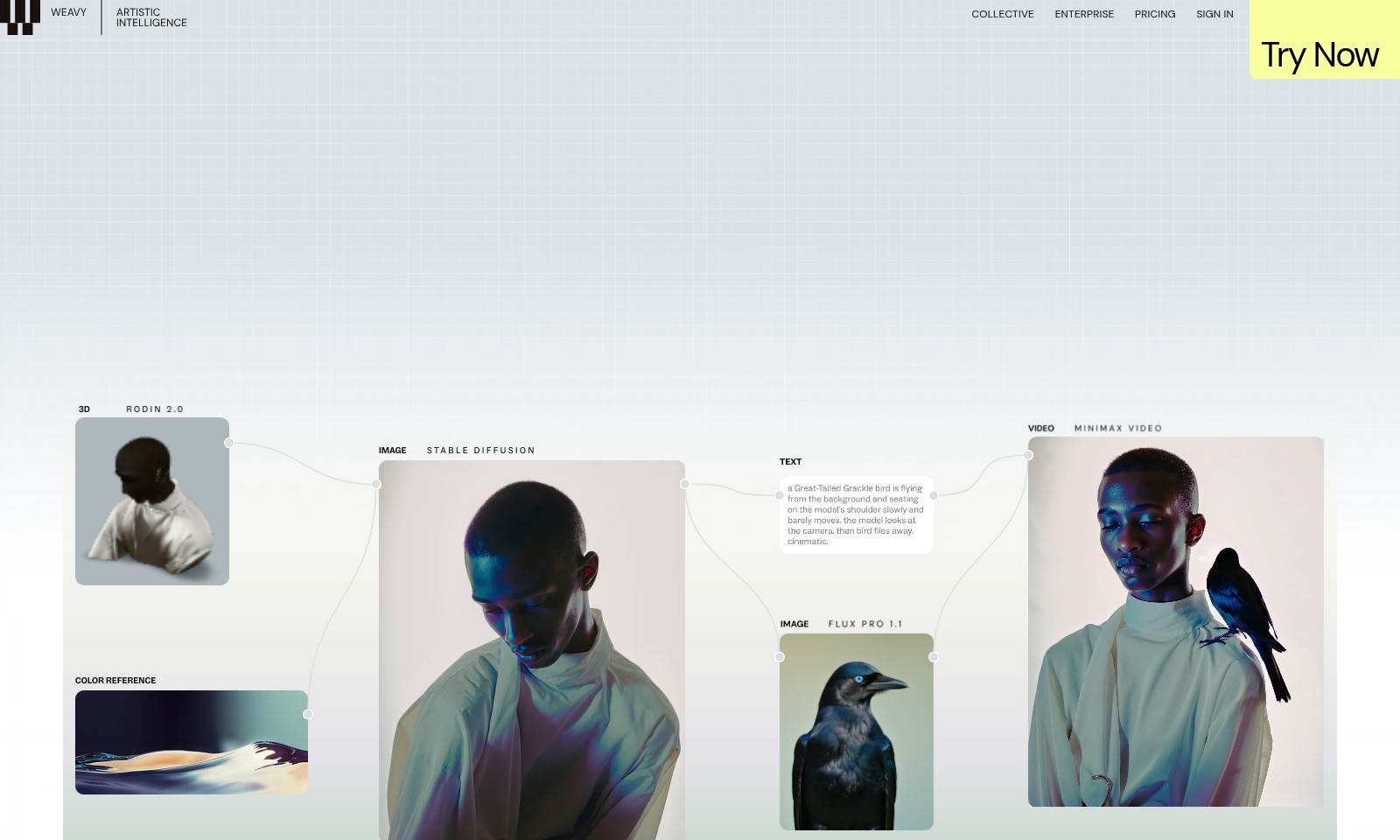
Weavy Introduction
Unlock Your Creative Potential with Weavy
Weavy is a cutting-edge platform designed to elevate your creative workflows by integrating all the AI models and professional editing tools you need in one intuitive interface. By eliminating the friction between different applications, Weavy allows you to transform your creative vision into reality seamlessly. With access to advanced tools like Invert, Outpaint, and Image Describer, you no longer have to compromise on quality or efficiency in your projects.
Weavy Features
Seamless AI Integration - Streamlined Creative Processes
Harness the power of advanced AI models all in one platform to create without limits. Experience improved productivity with integrated professional editing tools designed for efficiency.
Enhanced Workflow Automation - Simplified Team Collaboration
Automate repetitive tasks with our intuitive interface, enabling your team to focus on what matters most: creativity. Increase your project turnaround time by 30% with automatic adjustments and customizations.
Comprehensive Toolset - All-In-One Creativity
Access a wide range of editing tools like Inpaint, Upscale, and Image Describer in one seamless workflow. This functionality reduces the need for multiple software, saving time and ensuring consistency across your projects.
Dynamic Content Control - Tailored Creative Outputs
Adjust layers, types, and blends with precision to generate high-quality outputs that match your vision. Our platform increases the creative options available, allowing for unique project developments that set your work apart.
Professional Quality Assurance - Consistency You Can Trust
Maintain high standards with built-in quality control features that ensure your outputs meet professional benchmarks. Experience fewer revisions and higher client satisfaction rates, leading to increased referrals and repeat business.
Frequently Asked Questions About Weavy
FAQs about Weavy's Artistic Intelligence Platform
Q1: What is Weavy's Artistic Intelligence platform?
A1: Weavy's Artistic Intelligence platform combines various AI models and professional editing tools into one node-based system, allowing for streamlined creative workflows. It enables users to transform their creative ideas into scalable designs without compromising quality.
Q2: How can I access the AI models on this platform?
A2: Users can access all available AI models directly through the platform interface. With a simple sign-in, you can experiment with various models like GPT for text generation, SD 3.5 for image generation, and tools for video editing.
Q3: What is the pricing for Weavy's services?
A3: Weavy offers competitive enterprise pricing tailored to your needs. You can sign in to check plans or try the platform for free to explore its features.
Q4: Are there professional editing tools included?
A4: Yes, Weavy includes a suite of professional editing tools such as Inpaint, Mask Extractor, and Upscale. These tools work seamlessly within the platform, enhancing your creative capabilities.
Q5: Can I manage my workflow effectively on Weavy?
A5: Absolutely! The platform is designed to maximize team productivity with features that simplify user interfaces and allow for customizable workflows, making collaboration easier than ever.
Q6: How do I get started with Weavy?
A6: Getting started is easy! Simply sign up on our website and take advantage of the 'Try Now' option to explore the platform and its capabilities without any commitment.
How to Use Weavy
Step 1: Register an Account
To begin your creative journey, visit the website and click on the 'Try Now' button. Fill in the required details to create your account and verify your email address to activate your account.
Step 2: Sign In
Once your account is activated, go back to the homepage and click 'Sign In'. Enter your credentials to access the platform.
Step 3: Set Up Your Profile
After signing in, navigate to the profile settings. Add a profile picture and fill in your creative interests to personalize your experience.
Step 4: Explore AI Models
Go to the dashboard to explore various AI models available, such as GPT and SD 3.5. Click on each model for a brief overview and select the ones that suit your creative needs.
Step 5: Access Professional Editing Tools
Visit the editing tools section to discover features like Crop, Inpaint, and Upscale. Familiarize yourself with each tool to enhance your workflows effectively.
Step 6: Using Key Features
Begin creating by selecting an AI model and utilizing the editing tools. Use layers and blending options to control the outcome of your projects seamlessly. Start small and gradually use more complex features as you grow comfortable.
Step 7: Collaborate with Your Team
Leverage the platform's collaboration features. Share your projects with team members and use workflow automation to maximize efficiency. Set roles and permissions based on your team's needs.
Step 8: Export Your Work
After finalizing your project, use the export feature to download your creative output. Choose your preferred file format and resolution before saving.
Step 9: Provide Feedback
Visit the feedback section to share your thoughts on the platform. Your insights help improve the user experience for everyone.
Reviews
Pros
- Easy to use
- Fast processing
- Great results
- Affordable pricing
Cons
- Limited free version
- Requires internet connection
Comments
No comments yet. Be the first to share your thoughts!
Weavy - Alternative Platforms
For some alternatives to Weavy that you may need, we provide you with sites divided by features.

Yevideo is an all-in-one platform for AI-generated videos and images, offering various models for enhanced creativity and efficiency.
Easily generate dancing pet videos or GIFs by uploading photos and choosing templates, perfect for social media sharing.
Pixalice offers a powerful AI tool for generating high-quality images and videos from text or photos, featuring a vast style library and user-friendly interface.
MojoMake offers advanced AI tools for video and image creation, providing commercial rights and professional quality, all in one platform.