FakeYou
FakeYou allows users to generate audio or videos of famous characters speaking any text. Enjoy features like voice cloning and a variety of AI voices.
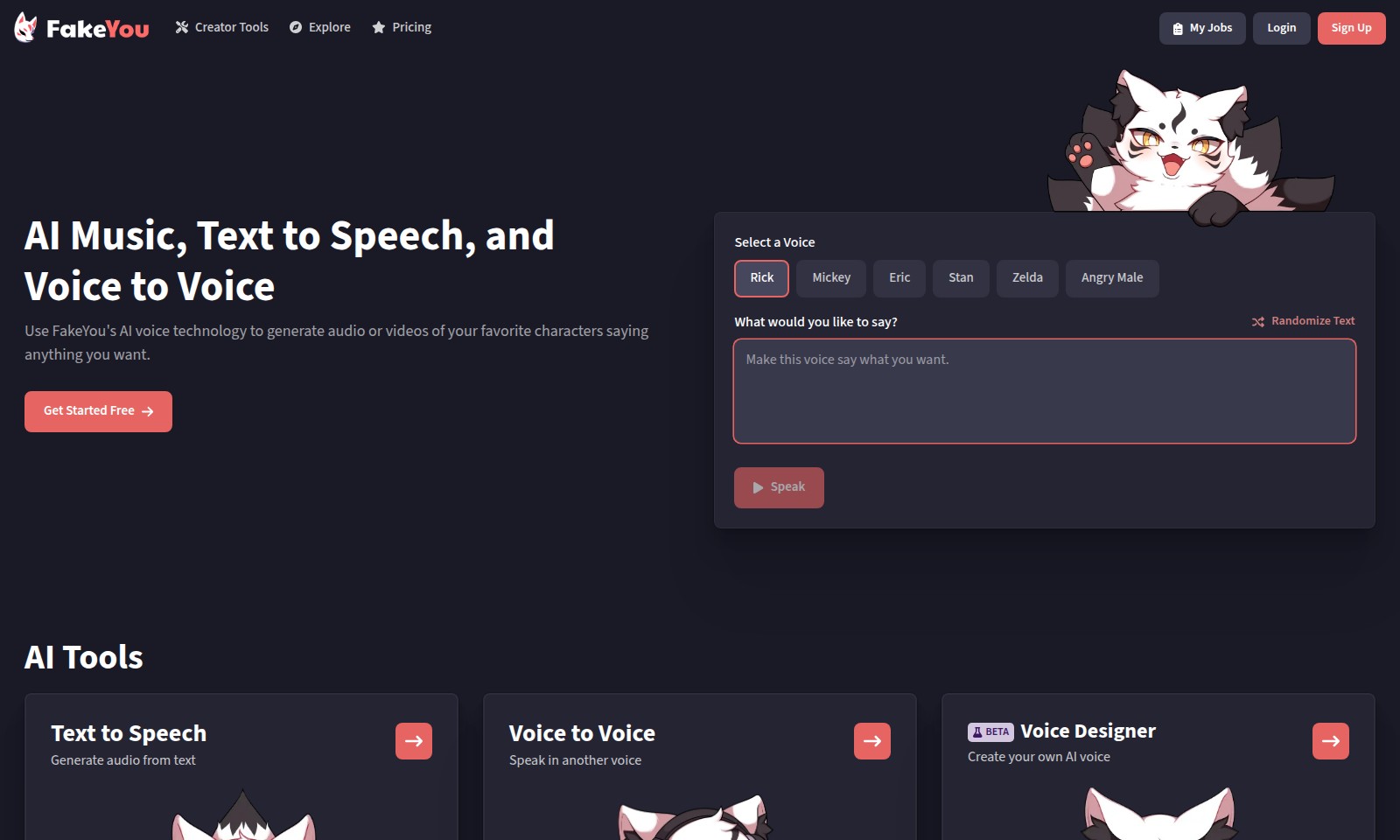
FakeYou Introduction
Harness the Power of AI Voice Technology
FakeYou empowers creators and innovators by offering cutting-edge AI voice technology that transforms text into engaging audio. With our platform, users can explore a diverse selection of voices, including characters and celebrities, allowing for unique and customized audio experiences tailored to their specific needs. Whether you're producing content for podcasts, videos, games, or any other medium, our tools make the process seamless and enjoyable.
FakeYou Features
AI Voice Generation - Seamless Creativity
Harness the power of FakeYou's voice technology to effortlessly create audio narrations for your projects. With a diverse selection of voices including popular characters and celebrities, users can add a personal touch to any content, enhancing its engagement and memorability. Notable Feature: Supports voice cloning and conversion, enabling users to transform any text into lifelike speech instantly.
Voice Designer - Customization at Your Fingertips
Create a unique AI voice that resonates with your brand or personal style. This feature allows users to design a voice tailored specifically to their projects, ensuring a consistent auditory identity across all communications. Notable Feature: Advanced customization options that adjust tone, pitch, and accent, providing a truly bespoke audio experience.
Zero-shot Voice Cloning - Instant Voice Duplication
Leverage cutting-edge zero-shot voice cloning technology to replicate any voice without extensive training data. This feature is particularly beneficial for agencies and content creators looking to produce authentic audio for diverse applications quickly. Notable Feature: Delivers accurate voice replication with minimal input, drastically reducing production time.
AI Music Generation - Innovate Your Audio Content
Stop relying solely on traditional soundtracks; with FakeYou's AI music generator, you can create unique musical compositions to accompany your audio projects. Tailor music to fit specific moods or themes effortlessly. Notable Feature: Generate multiple tracks based on user-defined parameters, ensuring perfect harmony with the voiceovers.
Multi-Language Capabilities - Expand Your Reach
FakeYou's platform supports multiple languages, allowing users to break language barriers and connect with global audiences. This feature is essential for businesses and creators aiming to reach multilingual customers. Notable Feature: High-quality language processing enables natural-sounding translations in real time, preserving the original content's nuance and tone.
Trusted by Millions - Reliable and Effective
Join a community of over 10 million satisfied users who rely on FakeYou for their voice generation needs. The platform is recognized for its user-friendliness and efficiency, making it an industry-leading choice. Notable Feature: Backed by Techstars and acclaimed by numerous tech reviews, ensuring consistent performance and innovation.
Frequently Asked Questions About FakeYou
Frequently Asked Questions
What is FakeYou's AI voice technology?
FakeYou's AI voice technology allows users to generate unique audio or videos featuring their favorite characters. You can choose from various celebrity voices to make your content more entertaining.
How do I use the Text to Speech feature?
To use the Text to Speech feature, simply enter the text you want to convert into speech, select your desired voice from our list, and click "Speak". It's a straightforward process that can help you bring your words to life.
Can I create my own AI voice?
Yes, our Voice Designer tool enables you to create a custom AI voice. This feature is suitable for those looking to make a personalized or unique audio experience, whether for entertainment or professional purposes.
Is there a cost associated with using FakeYou?
FakeYou offers a free option to get started. However, additional features or premium voices may require a subscription or one-time payment.
How to Use FakeYou
Register an Account
Visit the website and click on the 'Sign Up' button. Fill out the necessary information such as your name, email, and password to create your account.
Log In to Your Account
Once registered, click the 'Login' button and enter your credentials. This will take you to your user dashboard.
Set Up Your Profile
In your dashboard, navigate to the profile settings. Add a profile picture and update your information to personalize your account.
Select a Voice
Explore the 'Select a Voice' section where you can choose from various voice options like Rick, Mickey, and Zelda. Choose one that suits your needs for generating audio content.
Create Your First Audio
In the main interface, type in the text you want to convert to speech. Click on 'Speak' to generate your audio. Experiment with different voices and texts to see the results.
Explore AI Tools
Visit the 'AI Tools' section to discover more features like Text to Speech and Voice to Voice capabilities. Familiarize yourself with these tools for enhancing your projects.
Utilize the Voice Designer
If you're interested in creating custom sounds, explore the 'Voice Designer'. This tool allows you to create your unique AI voice for a personalized experience.
Try Voice Cloning
Experience the cutting-edge F5-TTS Voice Cloning in the BETA section. This feature allows you to clone voices with remarkable accuracy.
Engage with Community and Support
If you have questions, visit community forums or the support section. Engaging with other users can provide insights and helpful tips.
Reviews
Pros
- Easy to use
- Fast processing
- Great results
- Affordable pricing
Cons
- Limited free version
- Requires internet connection
Comments
No comments yet. Be the first to share your thoughts!
FakeYou - Alternative Platforms
For some alternatives to FakeYou that you may need, we provide you with sites divided by features.

Yevideo is an all-in-one platform for AI-generated videos and images, offering various models for enhanced creativity and efficiency.
Easily generate dancing pet videos or GIFs by uploading photos and choosing templates, perfect for social media sharing.
Pixalice offers a powerful AI tool for generating high-quality images and videos from text or photos, featuring a vast style library and user-friendly interface.
MojoMake offers advanced AI tools for video and image creation, providing commercial rights and professional quality, all in one platform.